게시판 구현하기
프로젝트 주제도 정했으니 이제 본격적으로 게시판을 구현해보자.
- MySQL에서 다음 쿼리문을 입력해 테이블을 생성한다.
tags: 태그 테이블 (예: #React, #Spring, #SQL 등)posts: 게시글 테이블post_tags: 게시글-태그 매핑 테이블 (게시글과 태그를 연결하는 중간 테이블)
CREATE TABLE tags (
  id INT AUTO_INCREMENT PRIMARY KEY,
  name VARCHAR(50) NOT NULL UNIQUE
);
CREATE TABLE posts (
  id INT AUTO_INCREMENT PRIMARY KEY,
  title VARCHAR(255) NOT NULL,
  content TEXT NOT NULL,
  author_id INT NOT NULL,
  created_at DATETIME DEFAULT CURRENT_TIMESTAMP,
  updated_at DATETIME DEFAULT CURRENT_TIMESTAMP ON UPDATE CURRENT_TIMESTAMP
);
CREATE TABLE post_tags (
  post_id INT NOT NULL,
  tag_id INT NOT NULL,
  PRIMARY KEY (post_id, tag_id),
  FOREIGN KEY (post_id) REFERENCES posts(id) ON DELETE CASCADE,
  FOREIGN KEY (tag_id) REFERENCES tags(id) ON DELETE CASCADE
);
게시글 조회하기
- 게시글 조회용으로
/routes/posts.js파일을 작성한다.
const express = require("express");
const router = express.Router();
const db = require("../db");

router.get("/", async (req, res) => {
    try {
        const [rows] = await db.query(`
            SELECT
                posts.id,
                posts.title,
                userinfo.name AS author,
                posts.created_at
            FROM posts
            JOIN userinfo ON posts.author_id = userinfo.id
            ORDER BY posts.id DESC
        `);
        res.json(rows);
    } catch (err) {
        console.error("DB 오류:", err);
        res.status(500).json({ error: "서버 오류" });
    }
});

module.exports = router;index.js파일을 수정한다.
const postsRouter = require("./routes/posts");
app.use("/api/posts", postsRouter);Home.jsx를 수정한다.
const [posts, setPosts] = useState([]);

useEffect(() => {
        fetch("/api/posts")
            .then((res) => res.json())
            .then((data) => setPosts(data));
}, []);

return (
        <div className="board-wrapper">
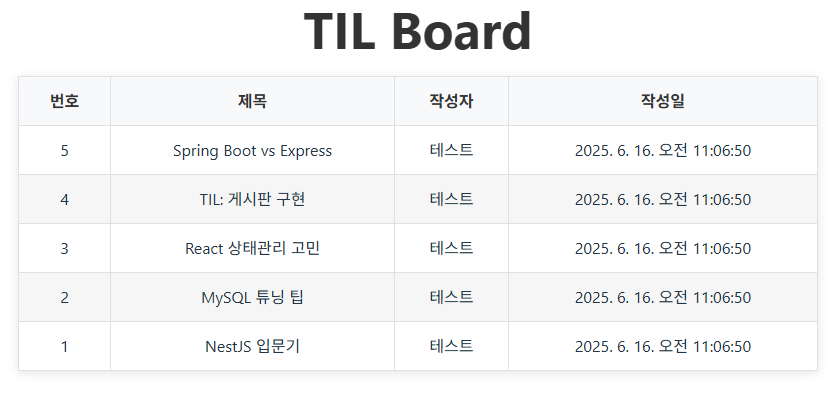
            <h1 className="board-title">TIL Board</h1>
            <table className="board-table">
                <thead>
                    <tr>
                        <th>번호</th>
                        <th>제목</th>
                        <th>작성자</th>
                        <th>작성일</th>
                    </tr>
                </thead>
                <tbody>
                    {posts.map((post) => (
                        <tr key={post.id}>
                            <td>{post.id}</td>
                            <td>{post.title}</td>
                            <td>{post.author}</td>
                            <td>
                                {new Date(post.created_at).toLocaleString()}
                            </td>
                        </tr>
                    ))}
                </tbody>
            </table>
        </div>
    );
페이지네이션 적용
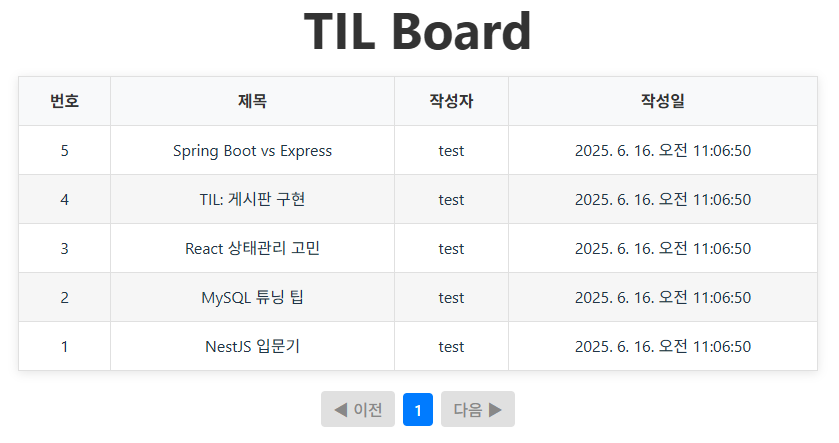
페이지네이션은 많은 양의 콘텐츠를 탐색하기 쉽도록 여러 화면에 나누고, 분할된 화면을 탐색하는 데 사용되는 요소이다. #
/routes/posts.js를 수정한다.
const express = require("express");
const router = express.Router();
const db = require("../db");

router.get("/", async (req, res) => {
    const page = parseInt(req.query.page) || 1;
    const pageSize = 10;
    const offset = (page - 1) * pageSize;

    try {
        const [rows] = await db.query(`
            SELECT
                posts.id,
                posts.title,
                userinfo.username AS author,
                posts.created_at
            FROM posts
            JOIN userinfo ON posts.author_id = userinfo.id
            ORDER BY posts.id DESC
            LIMIT ? OFFSET ?
        `, [pageSize, offset]);

        const [countResult] = await db.query(
            `SELECT COUNT(*) AS total FROM posts`
        );
        const total = countResult[0].total;

        res.json({
            posts: rows,
            total,
            page,
            totalPages: Math.ceil(total / pageSize),
        });
    } catch (err) {
        console.error("DB 오류:", err);
        res.status(500).json({ error: "서버 오류" });
    }
});

module.exports = router;Home.jsx를 수정한다.
function Home() {
    const [posts, setPosts] = useState([]);
    const [totalPages, setTotalPages] = useState(1);
    const [searchParams, setSearchParams] = useSearchParams();
    const page = parseInt(searchParams.get("page")) || 1;

    const fetchPosts = async (pageNum) => {
        const res = await fetch(`/api/posts?page=${pageNum}`);
        const data = await res.json();
        setPosts(data.posts);
        setTotalPages(data.totalPages);
        setSearchParams({ page: pageNum });
    };

    const renderPagination = () => {
        const buttons = [];
        const maxPage = totalPages;
        const current = page;
        // 이전 버튼
        buttons.push(
            <button
            key="prev"
            onClick={() => fetchPosts(current - 1)}
            disabled={current === 1}
            className={current === 1 ? "disabled" : ""}
            >
            ◀︎ 이전
            </button>
        );
        // 1번 페이지
        buttons.push(
            <button key={1} onClick={() => fetchPosts(1)} className={current === 1 ? "active" : ""}>
                1
            </button>
        );
        // … 왼쪽
        if (current > 3) {
            buttons.push(<span key="start-ellipsis">…</span>);
        }
        // 현재 기준 ±1 페이지
        for (let i = current - 1; i <= current + 1; i++) {
            if (i > 1 && i < maxPage) {
                buttons.push(
                    <button
                        key={i}
                        onClick={() => fetchPosts(i)}
                        className={current === i ? "active" : ""}
                    >
                        {i}
                    </button>
                );
            }
        }
        // … 오른쪽
        if (current < maxPage - 2) {
            buttons.push(<span key="end-ellipsis">…</span>);
        }
        // 마지막 페이지
        if (maxPage > 1) {
            buttons.push(
                <button key={maxPage} onClick={() => fetchPosts(maxPage)} className={current === maxPage ? "active" : ""}>
                    {maxPage}
                </button>
            );
        }
        // 다음 버튼
        buttons.push(
            <button
            key="next"
            onClick={() => fetchPosts(current + 1)}
            disabled={current === maxPage}
            className={current === maxPage ? "disabled" : ""}
            >
            다음 ▶︎
            </button>
        );
        return <div className="pagination">{buttons}</div>;
    };

    useEffect(() => {
        fetchPosts(page);
    }, [page]);

    return (
        <div className="board-wrapper">
            <h1 className="board-title">TIL Board</h1>
            <table className="board-table">
                <thead>
                    <tr>
                        <th>번호</th>
                        <th>제목</th>
                        <th>작성자</th>
                        <th>작성일</th>
                    </tr>
                </thead>
                <tbody>
                    {posts.map((post) => (
                        <tr key={post.id}>
                            <td>{post.id}</td>
                            <td>{post.title}</td>
                            <td>{post.author}</td>
                            <td>
                                {new Date(post.created_at).toLocaleString()}
                            </td>
                        </tr>
                    ))}
                </tbody>
            </table>
            <div className="pagination-wrapper">
                {renderPagination()}
            </div>
        </div>
    );
}
'Krafton Jungle > 6. Frameworks' 카테고리의 다른 글
| [WEEK14] Day 6 (0) | 2025.06.17 |
|---|---|
| [WEEK14] Day 3 (0) | 2025.06.14 |
| [WEEK14] Day 2 (0) | 2025.06.13 |
| [WEEK14] Day 1 (0) | 2025.06.12 |