스파르타클럽 | AI시대, 미래를 돌파하는 힘
누구나 잠재력을 깨워 나아가도록. IT 커리어의 모든 성장 과정을 스파르타클럽에서
academia.spartaclub.kr
🧩 JPA 연관관계 매핑
- 일대일 관계를 나타내는 매핑 정보
- 1:1 관계로 구성한다는 것은 하나의 테이블에서 관리할 수 있는 데이터일 가능성이 높기 때문에, 물리적으로 테이블을 분리해야 하는지 생각해봐야 함.
// 일대일 단방향
@Entity
public class Member {
  @Id @GeneratedValue
  @Column(name = "MEMBER_ID")
  private Long id;

  private String username;

  @OneToOne
  @JoinColumn(name = "LOCKER_ID")
  private Locker locker;
}

@Entity
public class Locker {
  @Id @GeneratedValue
  @Column(name = "LOCKER_ID")
  private Long id;

  private String name;
}
// 일대일 양방향
@Entity
public class Member {
@Id @GeneratedValue
@Column(name = "MEMBER_ID")
private Long id;
private String username;
@OneToOne
@JoinColumn(name = "LOCKER_ID")
private Locker locker;
}
@Entity
public class Locker {
@Id @GeneratedValue
@Column(name = "LOCKER_ID")
private Long id;
private String name;
@OneToOne(mappedBy = "locker")
private Member member;- 일대다 관계를 나타내는 매핑 정보
- 속도를 위해 기본적으로
FetchType이LAZY로 설정됨 - 속성
mappedBy: 연관관계의 주인 필드를 선택fetch: 글로벌 패치 전략 설정cascase: 영속성 전이 기능 사용targetEntity: 연관된 엔티티 타입 정보 설정
// 일대다 단방향 관계
@Entity(name = "parent")
public class Parent {
    @Id
    @GeneratedValue(strategy = GenerationType.IDENTITY)
    private Long id;

    @OneToMany
		@JoinColumn(name = "parent_id")
    private List<Child> childList;
}

@Entity(name = "child")
public class Child {
    @Id
    @GeneratedValue(strategy = GenerationType.IDENTITY)
    private Long id;

		@Column(name = "parent_id")
		private Long parentId;
}
// 다대일 양방향 관계
@Entity(name = "parent")
public class Parent {
@Id
@GeneratedValue(strategy = GenerationType.IDENTITY)
private Long id;
@OneToMany(mappedBy="parent")
private List<Child> childList;
}
@Entity(name = "child")
public class Child {
@Id
@GeneratedValue(strategy = GenerationType.IDENTITY)
private Long id;
@ManyToOne
@JoinColumn(name = "parent_id")
private Parent parent;
}- 다대일 관계를 나타내는 매핑 정보
- 속성
optional: 기본값 true (false로 설정하면 연관된 엔티티가 반드시 존재해야 함)fetch: 글로벌 패치 전략 설정 (기본값이EGEAR로 설정되어 있으나 실무에서는LAZY를 권장한다고 함)cascase: 영속성 전이 기능 사용targetEntity: 연관된 엔티티 타입 정보 설정
@Entity(name = "parent")
public class Parent {
    @Id
    @GeneratedValue(strategy = GenerationType.IDENTITY)
    private Long id;
}

@Entity(name = "child")
public class Child {
    @Id
    @GeneratedValue(strategy = GenerationType.IDENTITY)
    private Long id;

    @ManyToOne
    @JoinColumn(name = "parent_id")
    private Parent parent;
}
※ @JoinColumn
- 외래 키 매핑 시 사용 (Join을 요청하기 위한 매핑정보로 사용됨)
@ManyToOne어노테이션과 주로 사용됨- 어노테이션을 생략해도 외래키가 생성됨. (외래키의 이름이 기본 전략에 따라 결정됨)
- 속성
name: 매핑할 외래키의 이름referencedColumnName: 외래키가 참조하는 대상 테이블의 컬럼명foreignKey: 외래키 제약조건 지정 (테이블 생성 시에만 적용됨)unique/nullable/insertable/updateable/columnDefinition/table:@Column의 속성과 같음
- 다대다 관계를 나타내는 매핑 정보
- 중간 매핑테이블(
JointTable)이 자동으로 생성되며, 이는 JPA 상에서 숨겨져서 (Entity 없이) 관리됨 - 매핑 테이블 관리가 불가능에서 실무에서는 잘 사용되지 않는다고 한다.
@Entity
public class Parent {
    @Id
    @GeneratedValue(strategy = GenerationType.IDENTITY)
    private Long id;

    @ManyToMany(mappedBy = "parents")
    private List<Child> childs;
}

@Entity
public class Child {
    @Id
    @GeneratedValue(strategy = GenerationType.IDENTITY)
    private Long id;

    @ManyToMany
    @JoinTable(
        name = "parent_child",
        joinColumns = @JoinColumn(name = "parent_id"),
        inverseJoinColumns = @JoinColumn(name = "child_id")
    )
    private List<Parent> parents;
}- 실무에서는 매핑 테이블을 아래와 같은 형태(
@ManyToOne)로 직접 정의한다고 한다.
@Entity
public class Parent {
    @Id
    @GeneratedValue(strategy = GenerationType.IDENTITY)
    private Long id;

    @OneToMany(mappedBy = "parent")
    private List<ParentChild> parentChilds;
}

@Entity
public class ParentChild {
    @Id
    @GeneratedValue(strategy = GenerationType.IDENTITY)
    private Long id;

    @ManyToOne
		@JoinColumn("parent_id")
    private Parent parent;

    @ManyToOne
		@JoinColumn("child_id")
    private Child child;
}

@Entity
public class Child {
    @Id
    @GeneratedValue(strategy = GenerationType.IDENTITY)
    private Long id;

    @OneToMany(mappedBy = "child")
    private List<ParentChild> parentChilds;
}
@OneToMany vs @ManyToOne
@ManyToOne: 여러 개가 하나를 참조@OneToMany: 하나가 여러 개를 참조
예를 들어, Team과 Member에 대해서
- 여러 Member는 하나의 Team에 속해 있을 수 있으니 Member -> Team은
@ManyToOne - 하나의 Team에는 여러 Member가 있을 수 있으니 Team -> Member는
@OneToMany
@Entity
public class Member {

    @Id @GeneratedValue
    private Long id;

    private String name;

    @ManyToOne
    @JoinColumn(name = "team_id")
    private Team team;
}

@Entity
public class Team {

    @Id @GeneratedValue
    private Long id;

    private String name;

    @OneToMany(mappedBy = "team")
    private List<Member> members = new ArrayList<>();
}
그림으로 표현하자면 아래와 같다.
@ManyToOne
Doran ──┐
Oner  ──┤
Faker ──┼──> T1
Peyz  ──┤
Keria ──┘

@OneToMany
       ┌── Doran
       ├── Oner
T1 ────┼── Faker
       ├── Peyz
       └── Keria
1:M 관계에 대해 DB에서는 보통 M쪽 테이블이 외래키를 가진다. 위 예시에서는 member 테이블에 team_id가 들어간다. 그래서 JPA에서도 보통 @ManyToOne 쪽이 외래키를 직접 관리한다.
@ManyToOne @JoinColumn(name = "team_id") private Team team;: 실제 연관관계를 저장한다.@OneToMany(mappedBy = "team") private List<Member> members;: 이미Member.team가 관리하고 있는 관계를 읽어온다.
보통 연관관계의 주인은 @ManyToOne 쪽이 된다. 보통 조회 방향이 "자식 -> 부모" 방향이 많기 때문에 실무에서는 @ManyToOne을 더 자주 사용한다고 한다.
📦 주문 생성 및 조회
feat: 주문 생성 및 조회 기능 구현 · qkrwns1478/spring-order@110a0fa
@@ -46,6 +46,15 @@ public Product update(@PathVariable Long id, @RequestBody Product product) {
github.com
주문 시 상품은 1개만 선택할 수 있다고 가정해보자. 이 때 주문은 상품을 알아야 하지만, 상품은 주문을 몰라도 된다. 따라서 일대일 단방향으로 구현을 하기로 했다.
orders테이블 생성
CREATE TABLE orders (
    id BIGINT AUTO_INCREMENT PRIMARY KEY,
    product_id BIGINT,
    CONSTRAINT fk_orders_product
        FOREIGN KEY (product_id) REFERENCES products(id),
    CONSTRAINT uq_orders_product_id
        UNIQUE (product_id)
);Product엔티티 수정
package com.example.springorder.Product;

import jakarta.persistence.*;
import lombok.*;

@Setter @Getter
@Entity
@Table(name = "products")
public class Product {
    @Id
    @GeneratedValue(strategy = GenerationType.IDENTITY)
    @Column(name = "product_id")
    private Long id;

    private String name;
    private int price;
    private int quantity;

    public Product() {}

    @Builder
    public Product(Long id, String name, int price, int quantity) {
        this.id = id;
        this.name = name;
        this.price = price;
        this.quantity = quantity;
    }

}Order엔티티 생성
package com.example.springorder.Order;

import com.example.springorder.Product.Product;
import jakarta.persistence.*;
import lombok.*;

@Setter @Getter
@Entity
@Table(name = "orders")
public class Order {
    @Id
    @GeneratedValue(strategy = GenerationType.IDENTITY)
    private Long id;

    @OneToOne
    @JoinColumn(name = "product_id")
    private Product product;

    public Order() {}

    @Builder
    public Order(Product product) {
        this.product = product;
    }
}OrderController구현
package com.example.springorder.Order;

import org.springframework.http.HttpStatus;
import org.springframework.web.bind.annotation.*;
import org.springframework.web.server.ResponseStatusException;

import java.util.List;

@RestController
@RequestMapping("/orders")
public class OrderController {
    private final OrderRepository orderRepository;

    public OrderController(OrderRepository orderRepository) {
        this.orderRepository = orderRepository;
    }

    /* 주문 등록 */
    @PostMapping
    public Order create(@RequestBody Order order) {
        return orderRepository.save(order);
    }

    /* 주문 전체 조회 */
    @GetMapping
    public List<Order> findAll() {
        return orderRepository.findAll();
    }

    /* 주문 단건 조회 */
    @GetMapping("/{id}")
    public Order findById(@PathVariable Long id) {
        return orderRepository.findById(id)
                .orElseThrow(() -> new ResponseStatusException(HttpStatus.NOT_FOUND));
    }
}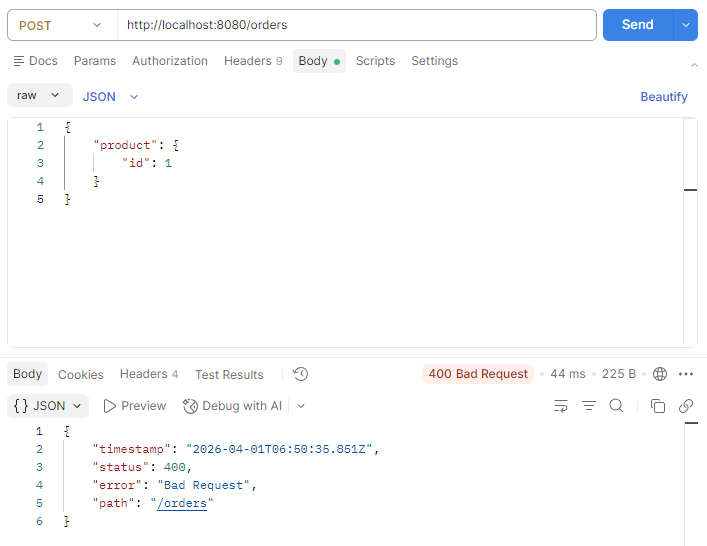
2026-04-01T15:47:48.091+09:00  WARN 5000 --- [spring-order] [nio-8080-exec-3] .w.s.m.s.DefaultHandlerExceptionResolver : Resolved [org.springframework.http.converter.HttpMessageNotReadableException: JSON parse error: Cannot construct instance of `com.example.springorder.Product.Product` (although at least one Creator exists): no int/Int-argument constructor/factory method to deserialize from Number value (1)]
2026-04-01T15:48:45.359+09:00  WARN 5000 --- [spring-order] [nio-8080-exec-2] .w.s.m.s.DefaultHandlerExceptionResolver : Resolved [org.springframework.http.converter.HttpMessageNotReadableException: JSON parse error: Cannot map `null` into type `int` (set `DeserializationFeature.FAIL_ON_NULL_FOR_PRIMITIVES` to 'false' to allow)]
2026-04-01T15:50:35.850+09:00  WARN 5000 --- [spring-order] [io-8080-exec-10] .w.s.m.s.DefaultHandlerExceptionResolver : Resolved [org.springframework.http.converter.HttpMessageNotReadableException: JSON parse error: Cannot map `null` into type `int` (set `DeserializationFeature.FAIL_ON_NULL_FOR_PRIMITIVES` to 'false' to allow)]
로그를 잘 읽어보니 Cannot map `null` into type `int`라고 한다. POST 요청을 보낼 때 product의 필드에 id만 적었는데, 실제로 Product는 name, price, quantity 필드가 필요하다. 우리가 원하는 것은 product의 id만 포함해야 하기 때문에, Order를 바로 받지 않고 요청 전용 DTO를 만들어서 따로 받기로 했다.
OrderRequest생성
package com.example.springorder.Order;

import lombok.Getter;
import lombok.Setter;

@Setter @Getter
public class OrderRequest {
    private Long productId;
}OrderController수정
/* 주문 등록 */
    @PostMapping
    public Order create(@RequestBody OrderRequest orderRequest) {
        Product product = productRepository.findById(orderRequest.getProductId())
                .orElseThrow(() -> new ResponseStatusException(HttpStatus.NOT_FOUND));
        Order order = Order.builder().product(product).build();
        return orderRepository.save(order);
    }
[spring-order] [nio-8080-exec-1] o.a.c.c.C.[.[.[/].[dispatcherServlet]    : Servlet.service() for servlet [dispatcherServlet] in context with path [] threw exception [Request processing failed: org.springframework.dao.InvalidDataAccessResourceUsageException: Could not prepare statement [Column "P1_0.PRODUCT_ID" not found; SQL statement:
select p1_0.product_id,p1_0.name,p1_0.price,p1_0.quantity from products p1_0 where p1_0.product_id=? [42122-240]] [select p1_0.product_id,p1_0.name,p1_0.price,p1_0.quantity from products p1_0 where p1_0.product_id=?]; SQL [select p1_0.product_id,p1_0.name,p1_0.price,p1_0.quantity from products p1_0 where p1_0.product_id=?]] with root cause

org.h2.jdbc.JdbcSQLSyntaxErrorException: Column "P1_0.PRODUCT_ID" not found; SQL statement:
select p1_0.product_id,p1_0.name,p1_0.price,p1_0.quantity from products p1_0 where p1_0.product_id=? [42122-240]
로그를 보니 코드 상의 컬럼명과 실제 DB의 컬럼명이 일치하지 않아 발생한 에러로 보인다.
Product엔티티 재수정
package com.example.springorder.Product;

import jakarta.persistence.*;
import lombok.*;

@Setter @Getter
@Entity
@Table(name = "products")
public class Product {
    @Id
    @GeneratedValue(strategy = GenerationType.IDENTITY)
    // @Column(name = "product_id") ← 삭제
    private Long id;

    private String name;
    private int price;
    private int quantity;

    public Product() {}

    @Builder
    public Product(Long id, String name, int price, int quantity) {
        this.id = id;
        this.name = name;
        this.price = price;
        this.quantity = quantity;
    }

}
@Column(name = "product_id")을 지우고 기본 키 컬럼을 id로 그대로 사용했다. orders 테이블에서 product_id 컬럼을 만들었기 때문에 products 테이블의 기본 키 이름도 product_id로 바꿔야 하는 줄 알았지만 그럴 필요가 없었던 것이다 😅
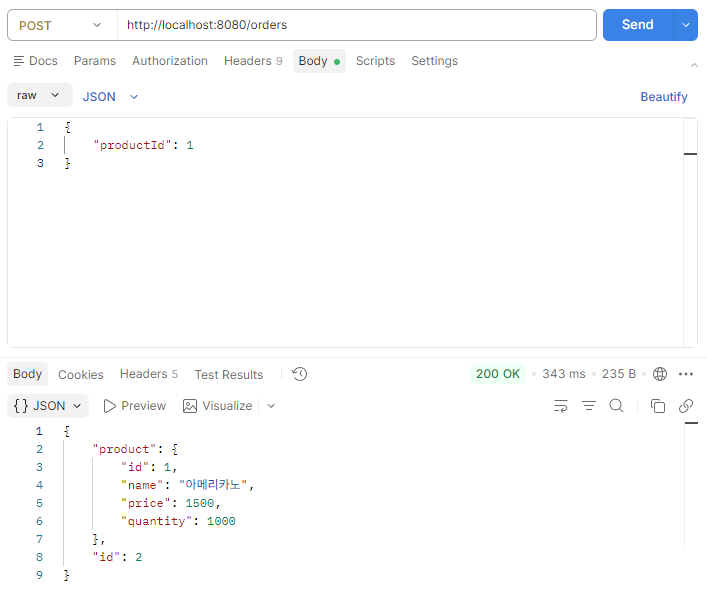
연관관계 확인하기
이미 생성된 주문에 대하여, 상품의 이름을 변경했을 때 해당 주문에서도 변경된 상품의 이름이 반영되는지 확인해보자.
OrderResponse생성: 상품 이름만 보여주면 되기 때문에 응답 전용 DTO를 생성했다.
package com.example.springorder.Order;

import lombok.Getter;
import lombok.Setter;

@Setter @Getter
public class OrderResponse {
    private Long id;
    private String productName;

    public OrderResponse(Long id, String name) {
        this.id = id;
        this.productName = name;
    }
}OrderController수정
/* 주문 단건 조회 */
    @GetMapping("/{id}")
    public OrderResponse findById(@PathVariable Long id) {
         Order order = orderRepository.findById(id)
                .orElseThrow(() -> new ResponseStatusException(HttpStatus.NOT_FOUND));
        return new OrderResponse(id, order.getProduct().getName());
    }
- ProductRequest 생성: 아무 생각 없이
changeName의 파라미터로String name만 달랑 줬더니 상품 이름이 JSON 형식으로 바뀐 것을 보고 깜짝 놀라서 서둘러 요청 DTO를 만들었다😅
package com.example.springorder.Product;

import lombok.Getter;
import lombok.Setter;

@Setter @Getter
public class ProductRequest {
    private String name;
}ProductController수정
/* 상품 이름 변경 */
    @PutMapping("/{id}")
    public Product changeName(@PathVariable Long id, @RequestBody ProductRequest productRequest) {
        Product new_product = productRepository.findById(id)
                .orElseThrow(() -> new ResponseStatusException(HttpStatus.NOT_FOUND));
        new_product.setName(productRequest.getName());
        return productRepository.save(new_product);
    }
이번에는 실행조차 실패하고 터져버렸다 🤯
org.springframework.beans.factory.BeanCreationException: Error creating bean with name 'requestMappingHandlerMapping' defined in class path resource [org/springframework/boot/webmvc/autoconfigure/WebMvcAutoConfiguration$EnableWebMvcConfiguration.class]: Ambiguous mapping. Cannot map 'productController' method
com.example.springorder.Product.ProductController#changeName(Long, String)
to {PUT [/products/{id}]}: There is already 'productController' bean method
com.example.springorder.Product.ProductController#update(Long, Product) mapped.
...
Caused by: java.lang.IllegalStateException: Ambiguous mapping. Cannot map 'productController' method
com.example.springorder.Product.ProductController#changeName(Long, String)
to {PUT [/products/{id}]}: There is already 'productController' bean method
...
로그를 보니 이미 @PutMapping("/{id}")이 사용 중인데 같은 어노테이션으로 다른 함수를 매핑해서 Duplicated 오류가 난 것으로 보인다.
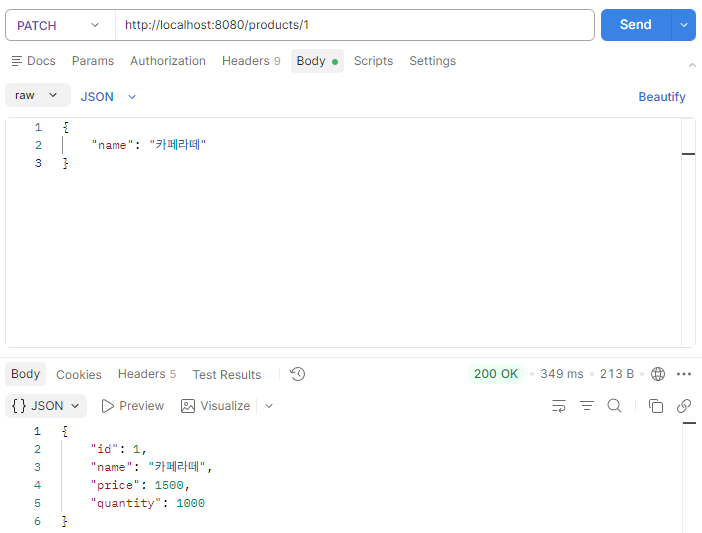
ProductController재수정: 매핑을PATCH로 변경했다.
/* 상품 이름 변경 */
    @PatchMapping("/{id}")
    public Product changeName(@PathVariable Long id, @RequestBody ProductRequest productRequest) {
        Product new_product = productRepository.findById(id)
                .orElseThrow(() -> new ResponseStatusException(HttpStatus.NOT_FOUND));
        new_product.setName(productRequest.getName());
        return productRepository.save(new_product);
    }
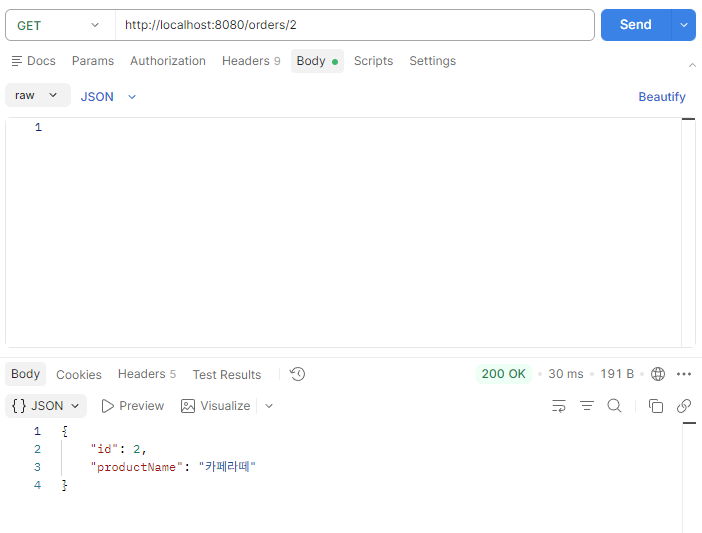
※ PUT과 PATCH의 차이
PUT: 서버에 있는 리소스를 완전 대체PATCH: 서버에 있는 리소스를 수정하고 부분 대체
💭 느낀 점
솔직히 말하면 이전에 Spring 프로젝트를 진행할 때는 DTO를 아무 생각 없이 만들었다😅 그냥 GPT가 이렇게 하니까, Gemini가 저렇게 쓰니까 '아, DTO라는 걸 만들어야 하는 구나'라고만 생각했지, 정작 DTO가 왜 필요한지에 대해서는 진지하게 생각해 본 적이 없었다.
하지만 오늘 AI 도움 없이 혼자 힘으로만 구현하면서 여러 에러들을 마주하게 되면서 DTO가 왜 필요한지 체감할 수 있었다.
DTO는 API에서 필요한 데이터만 주고받기 위해 쓴다.
- 엔티티를 그대로 받으면 필드가 많아서 JSON 오류가 나기 쉽다.
- 요청에 꼭 필요한 값만 받도록 만들 수 있다. (예: 상품 전체 대신
productId만 받기) - 응답도 필요한 값만 깔끔하게 보낼 수 있다. (예: 주문 전체 대신 주문번호, 상품명만 보내기)
📋 내일 할 일
- 테이블 객체로 페이지 조회하기 강의 수강
- 주문 목록 페이지네이션 조회 기능 구현
'내일배움캠프' 카테고리의 다른 글
| [내일배움캠프] IoC, DI, Bean (0) | 2026.04.06 |
|---|---|
| [내일배움캠프] Spring 입문 1주차 (0) | 2026.04.06 |
| [내일배움캠프 사전캠프] 동시성 이슈 해결하기 (0) | 2026.04.03 |
| [내일배움캠프 사전캠프] 페이지네이션과 N+1 문제 (0) | 2026.04.02 |
| [내일배움캠프 사전캠프] H2와 JPA (0) | 2026.03.31 |