📚 목차
🧩 소셜 로그인
OAuth
- 인터넷 사용자들이 비밀번호를 제공하지 않고 다른 웹사이트 상의 자신들의 정보에 대해 웹사이트나 애플리케이션의 접근 권한을 부여할 수 있는 공통적인 수단
- 접근 위임을 위한 개방형 표준
- 사용자가 애플리케이션에게 모든 권한을 넘기지 않고 사용자 대신 서비스를 이용할 수 있게 해주는 HTTP 기반의 보안 프로토콜
- 예: Google, Facebook, Naver, Kakao
카카오 로그인 사용 승인 받기
- Kakao Developers 회원가입
- [➕ 앱 생성] 버튼 클릭
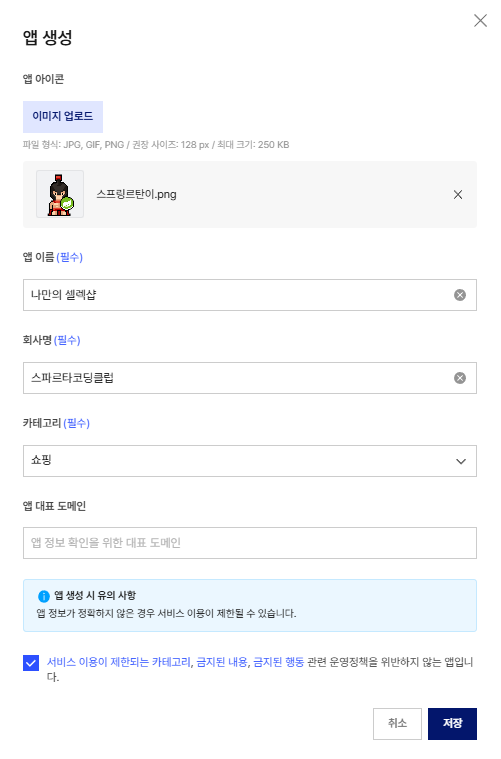
- 앱 - 플랫폼 키 탭에서 REST API 키 복사해서 사용하기

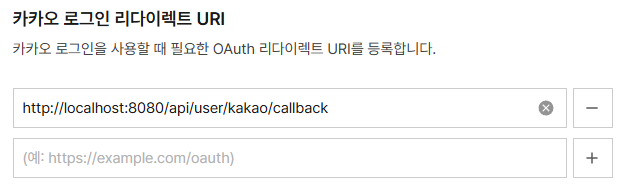
- REST API 키 페이지에서 Redirect URI 추가
- 카카오 로그인 - 일반 탭에서 사용 설정을 ON으로 하기
- 카카오 로그인 - 동의항목 탭에서 개인정보 설정하기
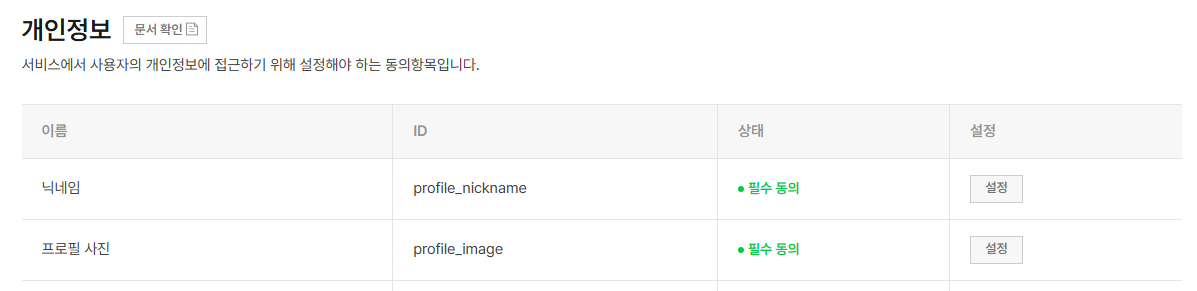
- 비즈앱 전환 및 이메일 추가하기: 개인정보에서 이메일을 가져오려면 비즈 앱으로 전환해야 한다.

🧩 카카오 사용자 정보 가져오기
.env: REST API 키와 Client Secret 키 저장applications.properties
app.kakao-rest-api=${KAKAO_REST_API}
app.kakao-client-secret=${KAKAO_CLIENT_SECRET}UserController: 컨트롤러에서 API 키 값을 로그인 페이지로 넘겨줘야 한다.
@Value("${app.kakao-rest-api}")
String kakaoRestApi;

@GetMapping("/user/login-page")
public String loginPage(Model model) {
    model.addAttribute("kakaoRestApi", kakaoRestApi);
    return "login";
}※System.getenv("...")와@Value("${...}")의 차이점
▪System.getenv(): 환경변수에서 직접 값을 가져옴
▪@Value(): Spring Boot 설정 파일에서 값을 가져옴
∴ 값을 어디서 읽느냐의 차이일 뿐, 실제 동작 상 차이는 없다.
login.html: 카카오 로그인 버튼 추가
<button id="login-kakao-btn"
        type="button"
        th:attr="data-kakao-url=@{https://kauth.kakao.com/oauth/authorize(
      client_id=${kakaoRestApi},
      redirect_uri='http://localhost:8080/api/user/kakao/callback',
      response_type='code'
    )}"
        onclick="location.href=this.dataset.kakaoUrl">
    카카오 로그인
</button>
- build.gradle 의존성 추가
implementation 'com.fasterxml.jackson.core:jackson-databind:2.18.2'UserController: 카카오 로그인 메서드 추가
@GetMapping("/user/kakao/callback")
public String kakaoLogin(@RequestParam String code, HttpServletResponse response) throws JsonProcessingException {
    String token = kakaoService.kakaoLogin(code);

    jwtUtil.addJwtToCookie(token, response);

    return "redirect:/";
}RestTemplateConfig: RestTemplate으로 외부 API 호출 시 일정 시간이 지나도 응답이 없을 때 무한 대기 상태 방지를 위해 강제 종료 설정
@Configuration
public class RestTemplateConfig  {
    @Bean
    public RestTemplate restTemplate(RestTemplateBuilder restTemplateBuilder) {
        return restTemplateBuilder
                .connectTimeout(Duration.ofMillis(5000))
                .readTimeout(Duration.ofMillis(5000))
                .build();

    }
}
KakaoService
▼ 코드 보기@Slf4j(topic = "KAKAO Login") @Service @RequiredArgsConstructor public class KakaoService { @Value("${app.kakao-rest-api}") private String kakaoRestApi; @Value("${app.kakao-client-secret}") private String kakaoClientSecret; private final PasswordEncoder passwordEncoder; private final UserRepository userRepository; private final RestTemplate restTemplate; private final JwtUtil jwtUtil; public String kakaoLogin(String code) throws JsonProcessingException { String accessToken = getToken(code); KakaoUserInfoDto kakaoUserInfo = getKakaoUserInfo(accessToken); return null; } private String getToken(String code) throws JsonProcessingException { URI uri = UriComponentsBuilder .fromUriString("https://kauth.kakao.com") .path("/oauth/token") .encode() .build() .toUri(); HttpHeaders headers = new HttpHeaders(); headers.add("Content-type", "application/x-www-form-urlencoded;charset=utf-8"); MultiValueMap<String, String> body = new LinkedMultiValueMap<>(); body.add("grant_type", "authorization_code"); body.add("client_id", kakaoRestApi); body.add("redirect_uri", "http://localhost:8080/api/user/kakao/callback"); body.add("code", code); body.add("client_secret", kakaoClientSecret); RequestEntity<MultiValueMap<String, String>> requestEntity = RequestEntity .post(uri) .headers(headers) .body(body); ResponseEntity<String> response = restTemplate.exchange( requestEntity, String.class ); JsonNode jsonNode = new ObjectMapper().readTree(response.getBody()); return jsonNode.get("access_token").asText(); } private KakaoUserInfoDto getKakaoUserInfo(String accessToken) throws JsonProcessingException { URI uri = UriComponentsBuilder .fromUriString("https://kapi.kakao.com") .path("/v2/user/me") .encode() .build() .toUri(); HttpHeaders headers = new HttpHeaders(); headers.add("Authorization", "Bearer " + accessToken); headers.add("Content-type", "application/x-www-form-urlencoded;charset=utf-8"); RequestEntity<MultiValueMap<String, String>> requestEntity = RequestEntity .post(uri) .headers(headers) .body(new LinkedMultiValueMap<>()); ResponseEntity<String> response = restTemplate.exchange( requestEntity, String.class ); JsonNode jsonNode = new ObjectMapper().readTree(response.getBody()); Long id = jsonNode.get("id").asLong(); String nickname = jsonNode.get("properties") .get("nickname").asText(); String email = jsonNode.get("kakao_account") .get("email").asText(); log.info("카카오 사용자 정보: " + id + ", " + nickname + ", " + email); return new KakaoUserInfoDto(id, nickname, email); } }

🧩 카카오 사용자 정보로 회원가입 구현하기
User:kakaoId컬럼 추가
private Long kakaoId;

public User(String username, String password, String email, UserRoleEnum role, Long kakaoId) {
    this.username = username;
    this.password = password;
    this.email = email;
    this.role = role;
    this.kakaoId =kakaoId;
}

public User kakaoIdUpdate(Long kakaoId) {
    this.kakaoId = kakaoId;
    return this;
}KakaoService: 로그인 수정 및 회원가입 메서드 추가
public String kakaoLogin(String code) throws JsonProcessingException {
    String accessToken = getToken(code);

    KakaoUserInfoDto kakaoUserInfo = getKakaoUserInfo(accessToken);

    User kakaoUser = registerKakaoUserIfNeeded(kakaoUserInfo);

    String createToken =  jwtUtil.createToken(kakaoUser.getUsername(), kakaoUser.getRole());

    return createToken;
}

private User registerKakaoUserIfNeeded(KakaoUserInfoDto kakaoUserInfo) {
    Long kakaoId = kakaoUserInfo.getId();
    User kakaoUser = userRepository.findByKakaoId(kakaoId).orElse(null);

    if (kakaoUser == null) {
        String kakaoEmail = kakaoUserInfo.getEmail();
        User sameEmailUser = userRepository.findByEmail(kakaoEmail).orElse(null);
        if (sameEmailUser != null) {
            kakaoUser = sameEmailUser;
            kakaoUser = kakaoUser.kakaoIdUpdate(kakaoId);
        } else {
            String password = UUID.randomUUID().toString();
            String encodedPassword = passwordEncoder.encode(password);

            String email = kakaoUserInfo.getEmail();

            kakaoUser = new User(kakaoUserInfo.getNickname(), encodedPassword, email, UserRoleEnum.USER, kakaoId);
        }

        userRepository.save(kakaoUser);
    }
    return kakaoUser;
}
'내일배움캠프' 카테고리의 다른 글
| [내일배움캠프] Spring AOP (0) | 2026.04.10 |
|---|---|
| [내일배움캠프] 단위 테스트와 통합 테스트 (0) | 2026.04.10 |
| [내일배움캠프] RestTemplate, Open API (0) | 2026.04.09 |
| [내일배움캠프] 필터, Spring Security, Validation (0) | 2026.04.08 |
| [내일배움캠프] JWT을 사용한 회원가입과 로그인 구현 (0) | 2026.04.08 |