[PintOS 1주차] Day 3
pintos 명령어 설정
pintos를 실행할 때마다 매번 ../../utils/pintos를 입력하는 것이 번거로워서 pintos 명령어의 PATH를 설정했다.
$ sudo ln -s ~/github/pintos-kaist/utils/pintos /usr/local/bin/pintos이제 pintos를 실행할 때 다음과 같이 입력하면 된다.
$ pintos -v -k -T 30 -m 20 -- -q run alarm-multiplegdb를 활용한 디버깅
VS Code의 Native Debug Extension을 사용했다. (참고)
$ pintos --gdb -- -q run alarm-multipleAlarm Clock 오류 해결하기
🔹 어제 테스트에서 무한루프가 발생했던 이유는 timer_interrupt()를 수정하지 않았기 때문이었다🤪
static void timer_interrupt (struct intr_frame *args UNUSED) {
    ticks++;
    thread_tick ();
    thread_wakeup(); // ← NEW
}
🔹 이후 테스트를 진행했을 때 무한루프가 발생하지 않았지만, 테스트 도중에 FAIL이 발생하는 문제가 새로 발생했다.
Kernel PANIC at ../../tests/threads/tests.c:93 in fail(): test failed
Call stack: 0x800421340b 0x8004216a0d 0x8004216f5e 0x8004216a76 0x8004216847 0x8004206636 0x8004206783 0x8004206120.
The backtrace' program can make call stacks useful.
Read "Backtraces" in the "Debugging Tools" chapter
of the Pintos documentation for more information.
Timer: 24 ticks
Thread: 1 idle ticks, 23 kernel ticks, 0 user ticks
🔹 문제를 해결하기 위해 다음과 같은 수정 과정을 거쳤다.
thread_wakeup(): 호출하는thread_unblock()의 내부 동작과 중복되는 코드를 제거했다.- sleep list 정렬하기 : 기존에는 단순히
list_push_back()이나list_remove()함수를 사용해서 리스트에 요소를 삽입/삭제했기 때문에 제대로 삽입이나 삭제가 되지 않을 위험성이 있었다. 이 문제는list_insert_ordered()를 사용해 리스트에 삽입할 때 정렬된 순서로 삽입하게 해서 해결했다.
/* 수정 전 */
list_push_back(&sleep_list, &curr->elem);

/* 수정 후 */
list_insert_ordered(&sleep_list, &curr->elem, compare_tick, NULL);
// copmare_tick: return t1->wakeup_tick < t2->wakeup_tick- sleep list가 정렬된 순서로 삽입되었기 때문에 wake up할 때도 리스트의 head(tick이 제일 작은 thread)만 pop해주는 것으로 바꾸면 된다.
/* 수정 전 */
for (e = list_begin (&list); e != list_end (&list); e = list_next (e)) {
    t = list_entry(e, struct thread, elem);
    if (t->wakeup_tick <= tick) {
    	list_remove(e);
        thread_unblock(t);
    } else break;
}

/* 수정 후 */
while (!list_empty(&sleep_list)) {
    t = list_entry(list_front (&sleep_list), struct thread, elem);
    if (t->wakeup_tick <= tick) {
        list_pop_front(&sleep_list);
        thread_unblock(t);
    } else break;
}
코드 수정 후 테스트 실행 결과는 다음과 같다.
| 수정 전 | 수정 후 |
 |
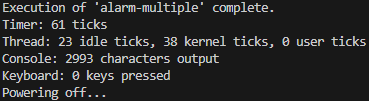 |
수정 전보다 후에서 ticks가 현저히 줄어든 것을 확인할 수 있다.
강의자료에서는 busy waiting을 제거한 후의 결과에서도 총 Timer ticks가 수정 전과 비슷했기 때문에 (0 idle + 860 kernel → 550 idle + 312 kernel) 이게 더 좋은건지 아닌지 잘 모르겠다.
make check 결과 23 of 27 test failed.로 오히려 결과가 전보다 더 나빠졌다🤦♂️
🔹 위의 while문 내부 로직을 다음과 같이 수정했다.
/* 수정 전 */
if (t->wakeup_tick <= tick) {
    list_pop_front(&sleep_list);
    thread_unblock(t);
} else {
    tick = t->wakeup_tick;
    break;
}

/* 수정 후 */
if (t->wakeup_tick <= timer_ticks()) {
    list_pop_front(&sleep_list);
    thread_unblock(t);
} else break;
원래 코드에서 tick은 the minimum value of local tick of the threads을 가지는 전역 변수로, sleep list를 스캔하기 위해 시간을 저장하는 용도다. 강의자료에서 언급된 대로 전역 변수를 선언, 초기화, 관련 함수들을 만들었다.
그런데 기껏 만들어놓은 코드 대신 timer_ticks()를 사용하니까 23 failed 문제가 해결되었다. tick을 사용했을 때는 왜 Timer ticks가 더 적게 나타났는지, 왜 수정 전에 pass했던 테스트도 fail이 떴는지 그 이유는 잘 모르겠다🤔

다시 make check를 한 결과 20 of 27 test failed. 로 돌아왔다.