오늘의 목표
- 클라이언트-서버 로직 분리 및 구현
- 클라이언트: UI / 입력 / 출력
- 서버: 게임 / 룰 / 상태
Java 소켓 통신 + 멀티스레드를 활용한 클라이언트-서버 구조 구현
※ Spring Boot를 활용한 방식이 아니라 Java 프로그램을 따로 만들어서 구현하는 방식임.
- 서버
ServerSocket을 열고 대기함- 클라이언트가 접속할 때마다 새로운
ClientHandler스레드를 생성하여 멀티 클라이언트를 동시에 처리함 - 클라이언트 2명이 모이면 하나의 게임 방으로 묶어 오목 게임을 진행시킴
- 클라이언트
- 서버의 IP와 포트로 Socket 접속함
- 입출력(UI)을 담당하며, 클릭 이벤트를 서버로 전송하고 서버의 응답(돌 위치, 승패 등)을 받아 화면에 그려냄
- 서버로부터 오는 메시지를 비동기적으로 받기 위해 수신용 스레드를 별도로 돌림
🔲 서버 측 코드 (소켓 + 멀티스레드)
▪ OhmokServer.java : 클라이언트의 연결을 받고, 각 클라이언트마다 스레드를 할당한다.
package com.example.ohmok.server;

import java.io.IOException;
import java.net.ServerSocket;
import java.net.Socket;
import java.util.concurrent.ConcurrentLinkedQueue;

public class OhmokServer {
    private static final int PORT = 8080;

    // 대기열: 접속한 플레이어들을 순서대로 담아둠
    private static ConcurrentLinkedQueue<ClientHandler> waitingQueue = new ConcurrentLinkedQueue<>();

    public static void main(String[] args) {
        System.out.println("오목 서버 시작... 포트: " + PORT);
        try (ServerSocket serverSocket = new ServerSocket(PORT)) {
            while (true) {
                Socket clientSocket = serverSocket.accept();
                System.out.println("새로운 클라이언트 접속: " + clientSocket.getInetAddress());

                // 클라이언트를 처리할 스레드 생성 및 실행
                ClientHandler handler = new ClientHandler(clientSocket);
                new Thread(handler).start();

                // 대기열에 추가하고 2명이 모이면 게임 방 생성
                waitingQueue.add(handler);
                matchPlayers();
            }
        } catch (IOException e) {
            e.printStackTrace();
        }
    }

    private static synchronized void matchPlayers() {
        if (waitingQueue.size() >= 2) {
            ClientHandler player1 = waitingQueue.poll();
            ClientHandler player2 = waitingQueue.poll();

            // 두 플레이어를 하나의 게임 룸으로 묶음
            GameRoom room = new GameRoom(player1, player2);
            player1.setGameRoom(room, 1); // 흑
            player2.setGameRoom(room, 2); // 백

            System.out.println("새로운 게임 매칭 완료!");
            room.startGame();
        }
    }
}
▪ ClientHandler.java : 각 클라이언트와 스트림을 통해 메시지를 주고받는 스레드
package com.example.ohmok.server;

import lombok.Getter;
import java.io.*;
import java.net.Socket;

public class ClientHandler implements Runnable {
    private Socket socket;
    private BufferedReader in;
    private PrintWriter out;
    private GameRoom gameRoom;
    @Getter
    private int playerColor;

    public ClientHandler(Socket socket) {
        this.socket = socket;
        try {
            in = new BufferedReader(new InputStreamReader(socket.getInputStream()));
            out = new PrintWriter(socket.getOutputStream(), true);
            sendMessage("WAIT:다른 플레이어를 기다리는 중입니다...");
        } catch (IOException e) {
            e.printStackTrace();
        }
    }

    public void setGameRoom(GameRoom gameRoom, int playerColor) {
        this.gameRoom = gameRoom;
        this.playerColor = playerColor;
    }

    public void sendMessage(String msg) {
        out.println(msg);
    }

    @Override
    public void run() {
        try {
            String message;
            // 클라이언트로부터 좌표 입력 수신
            while ((message = in.readLine()) != null) {
                if (message.startsWith("MOVE:") && gameRoom != null) {
                    String[] parts = message.split(":");
                    int x = Integer.parseInt(parts[1]);
                    int y = Integer.parseInt(parts[2]);

                    // 게임 방으로 착수 정보 전달
                    gameRoom.handleMove(this, x, y);
                }
            }
        } catch (IOException e) {
            System.out.println("클라이언트 연결 종료: " + socket.getInetAddress());
        } finally {
            if (gameRoom != null) gameRoom.handleDisconnect(this);
            try { socket.close(); } catch (IOException e) {}
        }
    }
}
▪ GameRoom.java : 기존에 구현한 게임 로직을 사용해 유효성을 검사함
package com.example.ohmok.server;

import com.example.ohmok.model.Game;
import com.example.ohmok.service.RenjuRules;

public class GameRoom {
    private ClientHandler player1; // 흑 (1)
    private ClientHandler player2; // 백 (2)
    private Game game;

    public GameRoom(ClientHandler p1, ClientHandler p2) {
        this.player1 = p1;
        this.player2 = p2;
        this.game = new Game("room-" + System.currentTimeMillis());
    }

    public void startGame() {
        player1.sendMessage("START:1:당신은 흑돌입니다. 먼저 시작하세요.");
        player2.sendMessage("START:2:당신은 백돌입니다. 흑돌을 기다리세요.");
    }

    public synchronized void handleMove(ClientHandler player, int x, int y) {
        if (game.isFinished()) return;

        // 턴 확인
        if (game.getCurrentPlayer() != player.getPlayerColor()) {
            player.sendMessage("ERROR:상대방의 차례입니다.");
            return;
        }

        int[][] board = game.getBoard();
        if (board[x][y] != 0) {
            player.sendMessage("ERROR:이미 돌이 놓여있습니다.");
            return;
        }

        // 흑돌 금수 체크
        if (player.getPlayerColor() == 1) {
            board[x][y] = 1;
            RenjuRules.ForbiddenResult fr = RenjuRules.isForbiddenBlackMove(board, x, y);
            if (fr.forbidden()) {
                board[x][y] = 0;
                player.sendMessage("ERROR:금수입니다 (" + fr.reason() + ")");
                return;
            }
        } else {
            board[x][y] = 2;
        }

        game.incMoveCount();

        // 양쪽 클라이언트에 착수 결과 방송
        broadcast("UPDATE:" + player.getPlayerColor() + ":" + x + ":" + y);

        // 승패 판정
        int winner = RenjuRules.checkWinner(board, x, y);
        if (winner != 0) {
            game.setFinished(true);
            broadcast("END:" + winner + ":플레이어 " + winner + " 승리!");
            return;
        }

        // 턴 교체
        game.setCurrentPlayer(player.getPlayerColor() == 1 ? 2 : 1);
        broadcast("TURN:" + game.getCurrentPlayer());
    }

    public void handleDisconnect(ClientHandler player) {
        game.setFinished(true);
        ClientHandler other = (player == player1) ? player2 : player1;
        other.sendMessage("END:0:상대방의 연결이 끊어졌습니다.");
    }

    private void broadcast(String msg) {
        player1.sendMessage(msg);
        player2.sendMessage(msg);
    }
}
🔲 클라이언트 측 코드 (Java Swing UI + 통신 스레드)
package com.example.ohmok.client;

import javax.swing.*;
import java.awt.*;
import java.awt.event.MouseAdapter;
import java.awt.event.MouseEvent;
import java.io.*;
import java.net.Socket;

public class OhmokClient extends JFrame {
    private static final int CELL = 30;
    private static final int SIZE = 19;

    private Socket socket;
    private BufferedReader in;
    private PrintWriter out;

    private int[][] board = new int[SIZE][SIZE];
    private int myColor = 0;
    private JLabel statusLabel;
    private BoardPanel boardPanel;

    public OmokClient() {
        setTitle("오목 게임");
        setSize(CELL * SIZE + 50, CELL * SIZE + 100);
        setDefaultCloseOperation(JFrame.EXIT_ON_CLOSE);

        statusLabel = new JLabel("서버에 접속 중...", SwingConstants.CENTER);
        statusLabel.setFont(new Font("맑은 고딕", Font.BOLD, 16));
        add(statusLabel, BorderLayout.NORTH);

        boardPanel = new BoardPanel();
        add(boardPanel, BorderLayout.CENTER);

        connectToServer();
        setVisible(true);
    }

    private void connectToServer() {
        try {
            socket = new Socket("localhost", 8080);
            in = new BufferedReader(new InputStreamReader(socket.getInputStream()));
            out = new PrintWriter(socket.getOutputStream(), true);

            // 서버의 메시지를 비동기적으로 계속 듣기 위한 별도 스레드
            new Thread(() -> {
                try {
                    String message;
                    while ((message = in.readLine()) != null) {
                        handleServerMessage(message);
                    }
                } catch (IOException e) {
                    statusLabel.setText("서버와의 연결이 끊어졌습니다.");
                }
            }).start();

        } catch (IOException e) {
            statusLabel.setText("서버 접속 실패!");
        }
    }

    private void handleServerMessage(String msg) {
        String[] parts = msg.split(":");
        String command = parts[0];

        switch (command) {
            case "WAIT":
                statusLabel.setText(parts[1]);
                break;
            case "START":
                myColor = Integer.parseInt(parts[1]);
                statusLabel.setText(parts[2]);
                break;
            case "UPDATE":
                int color = Integer.parseInt(parts[1]);
                int x = Integer.parseInt(parts[2]);
                int y = Integer.parseInt(parts[3]);
                board[x][y] = color;
                boardPanel.repaint();
                break;
            case "TURN":
                int turnColor = Integer.parseInt(parts[1]);
                statusLabel.setText((turnColor == myColor)
                    ? "당신의 차례입니다!"
                    : "상대방의 차례입니다.");
                break;
            case "ERROR":
                JOptionPane.showMessageDialog(this, parts[1], "경고", JOptionPane.WARNING_MESSAGE);
                break;
            case "END":
                statusLabel.setText(parts[2]);
                JOptionPane.showMessageDialog(this, parts[2], "게임 종료", JOptionPane.INFORMATION_MESSAGE);
                break;
        }
    }

    class BoardPanel extends JPanel {
        public BoardPanel() {
            setBackground(new Color(220, 179, 92)); // 바둑판 색상
            addMouseListener(new MouseAdapter() {
                @Override
                public void mouseClicked(MouseEvent e) {
                    if (myColor == 0) return; // 아직 게임 시작 안함

                    int x = Math.round((float) e.getX() / CELL) - 1;
                    int y = Math.round((float) e.getY() / CELL) - 1;

                    if (x >= 0 && x < SIZE && y >= 0 && y < SIZE) {
                        // 클라이언트는 서버로 좌표만 전송 (검증은 서버가 함)
                        out.println("MOVE:" + x + ":" + y);
                    }
                }
            });
        }

        @Override
        protected void paintComponent(Graphics g) {
            super.paintComponent(g);
            // 선 그리기
            for (int i = 0; i < SIZE; i++) {
                g.drawLine(CELL, CELL + i * CELL, CELL * SIZE, CELL + i * CELL);
                g.drawLine(CELL + i * CELL, CELL, CELL + i * CELL, CELL * SIZE);
            }
            // 돌 그리기
            for (int i = 0; i < SIZE; i++) {
                for (int j = 0; j < SIZE; j++) {
                    if (board[i][j] == 1) { // 흑
                        g.setColor(Color.BLACK);
                        g.fillOval(CELL + i * CELL - CELL/2, CELL + j * CELL - CELL/2, CELL, CELL);
                    } else if (board[i][j] == 2) { // 백
                        g.setColor(Color.WHITE);
                        g.fillOval(CELL + i * CELL - CELL/2, CELL + j * CELL - CELL/2, CELL, CELL);
                    }
                }
            }
        }
    }

    public static void main(String[] args) {
        new OhmokClient();
    }
}
Spring Boot + WebSocket으로 클라이언트-서버 구현하기
위 방식은 Spring Boot나 웹 UI가 아니라 별도의 Java 프로그램 형식으로 구현되어서 내가 의도했던 방식은 아니다. 그럼에도 불구하고 위 방식을 굳이 소개한 이유는 Spring Boot에서는 개발자가 별도로 멀티스레드 환경을 구축할 필요 없이 그 자체로도 멀티스레드를 잘 지원하기 때문이다.
Spring Boot에 내장된 Tomcat 서버는 기본적으로 Thread Pool을 사용한다. 수십~백 명의 클라이언트가 동시에 API를 호출해도, 서버가 알아서 각각의 요청을 별도의 스레드에 할당하여 동시에 (멀티스레드로) 처리한다. 개발자가 굳이 new Thread()나 Runnable를 직접 써가며 짤 필요가 없도록 다 만들어놓은 것이 Spring Boot다.
다만 이전에 구현한 방식인 단방향 HTTP REST API만으로는 실시간 멀티 클라이언트를 처리하기 어렵기 때문에 WebSocket을 사용해야 한다.
▪ build.gradle : 의존성 추가
dependencies {
    // ...
    implementation 'org.springframework.boot:spring-boot-starter-websocket' // 추가
    // ...
}
▪ WebConfig.java : 서버 설정 추가 (CORS 허용)
package com.example.ohmok.config;

import org.springframework.context.annotation.Configuration;
import org.springframework.web.servlet.config.annotation.CorsRegistry;
import org.springframework.web.servlet.config.annotation.WebMvcConfigurer;

@Configuration
public class WebConfig implements WebMvcConfigurer {
    @Override
    public void addCorsMappings(CorsRegistry registry) {
        registry.addMapping("/api/**")
                .allowedOriginPatterns("*")
                .allowedMethods("GET", "POST", "PUT", "DELETE", "OPTIONS")
                .allowCredentials(true);
    }
}
▪ WebSocketConfig.java : 웹소켓 설정
package com.example.ohmok.config;

import org.springframework.context.annotation.Configuration;
import org.springframework.messaging.simp.config.MessageBrokerRegistry;
import org.springframework.web.socket.config.annotation.EnableWebSocketMessageBroker;
import org.springframework.web.socket.config.annotation.StompEndpointRegistry;
import org.springframework.web.socket.config.annotation.WebSocketMessageBrokerConfigurer;

@Configuration
@EnableWebSocketMessageBroker
public class WebSocketConfig implements WebSocketMessageBrokerConfigurer {

    @Override
    public void registerStompEndpoints(StompEndpointRegistry registry) {
        registry.addEndpoint("/ws-ohmok")
                .setAllowedOriginPatterns("*")
                .withSockJS();
    }

    @Override
    public void configureMessageBroker(MessageBrokerRegistry registry) {
        registry.enableSimpleBroker("/topic");
        registry.setApplicationDestinationPrefixes("/app");
    }
}
▪ WebSocketGameController.java : 웹소켓 컨트롤러
package com.example.ohmok.controller;

import com.example.ohmok.dto.GameStateResponse;
import com.example.ohmok.dto.MoveRequest;
import com.example.ohmok.exception.ApiException;
import com.example.ohmok.service.GameService;
import org.springframework.messaging.handler.annotation.DestinationVariable;
import org.springframework.messaging.handler.annotation.MessageExceptionHandler;
import org.springframework.messaging.handler.annotation.MessageMapping;
import org.springframework.messaging.handler.annotation.SendTo;
import org.springframework.messaging.simp.annotation.SendToUser;
import org.springframework.stereotype.Controller;

import java.util.Map;

@Controller
public class WebSocketGameController {

    private final GameService gameService;

    public WebSocketGameController(GameService gameService) {
        this.gameService = gameService;
    }

    @MessageMapping("/game/{id}/move")
    @SendTo("/topic/game/{id}")
    public GameStateResponse makeMove(@DestinationVariable String id, MoveRequest req) {
        return gameService.makeMove(id, req.x(), req.y());
    }

    @MessageExceptionHandler(ApiException.class)
    @SendToUser("/topic/errors")
    public Map<String, String> handleException(ApiException e) {
        return Map.of("error", e.getMessage());
    }
}
▪ index.html : 실시간 멀티플레이 웹 클라이언트
<!DOCTYPE html>
<html lang="ko">
<head>
    <meta charset="UTF-8">
    <title>오목 게임</title>
    <script src="https://cdn.jsdelivr.net/npm/sockjs-client@1/dist/sockjs.min.js"></script>
    <script src="https://cdnjs.cloudflare.com/ajax/libs/stomp.js/2.3.3/stomp.min.js"></script>
    <style>
        body { font-family: sans-serif; text-align: center; }
        #board { background-color: #e0a96d; border: 2px solid #5c3a21; cursor: pointer; margin-top: 10px;}
        .info { margin: 10px; font-size: 1.2em; font-weight: bold; }
        .error { color: red; font-weight: bold; height: 20px;}
    </style>
</head>
<body>
<h1>오목 게임</h1>
<div>
    <button onclick="createGame()">새 방 만들기</button>
    <input type="text" id="gameIdInput" placeholder="입장할 방 ID 입력">
    <button onclick="joinGame()">방 입장하기</button>
</div>

<div class="info" id="status">게임을 시작하거나 방에 입장하세요.</div>
<div class="error" id="errorMessage"></div>

<canvas id="board" width="570" height="570" onclick="handleBoardClick(event)"></canvas>

<script>
    const API_BASE = "http://localhost:8080/api/games";
    const WS_URL = "http://localhost:8080/ws-ohmok";

    let stompClient = null;
    let currentGameId = null;
    let isFinished = false;

    const canvas = document.getElementById("board");
    const ctx = canvas.getContext("2d");
    drawEmptyBoard();

    /* 방 생성 */
    async function createGame() {
        const res = await fetch(API_BASE, { method: "POST" });
        const data = await res.json();
        document.getElementById("gameIdInput").value = data.gameId;
        joinGame();
    }

    /* 방 입장 & 웹소켓 연결 */
    function joinGame() {
        const gameId = document.getElementById("gameIdInput").value;
        if(!gameId) {
            alert("방 ID를 입력하세요."); return;
        }
        currentGameId = gameId;

        // 웹소켓 연결 시작
        const socket = new SockJS(WS_URL);
        stompClient = Stomp.over(socket);
        stompClient.debug = null;

        stompClient.connect({}, function (frame) {
            document.getElementById("status").innerText = "방 입장 완료! 게임을 시작합니다.";
            document.getElementById("errorMessage").innerText = "";

            // 다른 사용자가 돌을 두었을 때 상태 업데이트 받기
            stompClient.subscribe('/topic/game/' + currentGameId, function (message) {
                const gameState = JSON.parse(message.body);
                updateBoardAndStatus(gameState);
            });

            // 금수 에러 등 개인 메시지 받기
            stompClient.subscribe('/user/topic/errors', function (message) {
                const errorData = JSON.parse(message.body);
                document.getElementById("errorMessage").innerText = errorData.error;
            });

            // 처음 입장 시 현재 게임 상태 불러오기
            fetch(API_BASE + "/" + currentGameId)
                .then(res => res.json())
                .then(data => updateBoardAndStatus(data));
        });
    }

    /* 바둑판 클릭 */
    function handleBoardClick(event) {
        if (!stompClient || !currentGameId || isFinished) return;

        const rect = canvas.getBoundingClientRect();
        const y = Math.floor((event.clientX - rect.left) / 30);
        const x = Math.floor((event.clientY - rect.top) / 30);

        if (x < 0 || x >= 19 || y < 0 || y >= 19) return;

        document.getElementById("errorMessage").innerText = "";

        stompClient.send("/app/game/" + currentGameId + "/move", {}, JSON.stringify({ x: x, y: y }));
    }

    // 상태 및 UI 업데이트
    function updateBoardAndStatus(state) {
        isFinished = state.finished;
        const statusEl = document.getElementById("status");
        if (state.finished) {
            statusEl.innerText = state.winner === 1 ? "흑 승리!" : (state.winner === 2 ? "백 승리!" : "무승부!");
        } else {
            statusEl.innerText = `현재 차례: ${state.currentPlayer === 1 ? '흑(1)' : '백(2)'} (총 ${state.moveCount}수)`;
        }
        drawBoardState(state.board);
    }

    // 바둑판 그리기 로직
    function drawEmptyBoard() {
        ctx.clearRect(0, 0, canvas.width, canvas.height);
        ctx.strokeStyle = "#5c3a21"; ctx.lineWidth = 1;
        for (let i = 0; i < 19; i++) {
            ctx.beginPath(); ctx.moveTo(15, 15 + i * 30); ctx.lineTo(555, 15 + i * 30); ctx.stroke();
            ctx.beginPath(); ctx.moveTo(15 + i * 30, 15); ctx.lineTo(15 + i * 30, 555); ctx.stroke();
        }
    }
    function drawBoardState(board) {
        drawEmptyBoard();
        for (let i = 0; i < 19; i++) {
            for (let j = 0; j < 19; j++) {
                if (board[i][j] !== 0) {
                    ctx.beginPath();
                    ctx.arc(15 + j * 30, 15 + i * 30, 13, 0, 2 * Math.PI);
                    ctx.fillStyle = board[i][j] === 1 ? "black" : "white";
                    ctx.fill();
                    if (board[i][j] === 2) { ctx.strokeStyle = "black"; ctx.stroke(); }
                }
            }
        }
    }
</script>
</body>
</html>
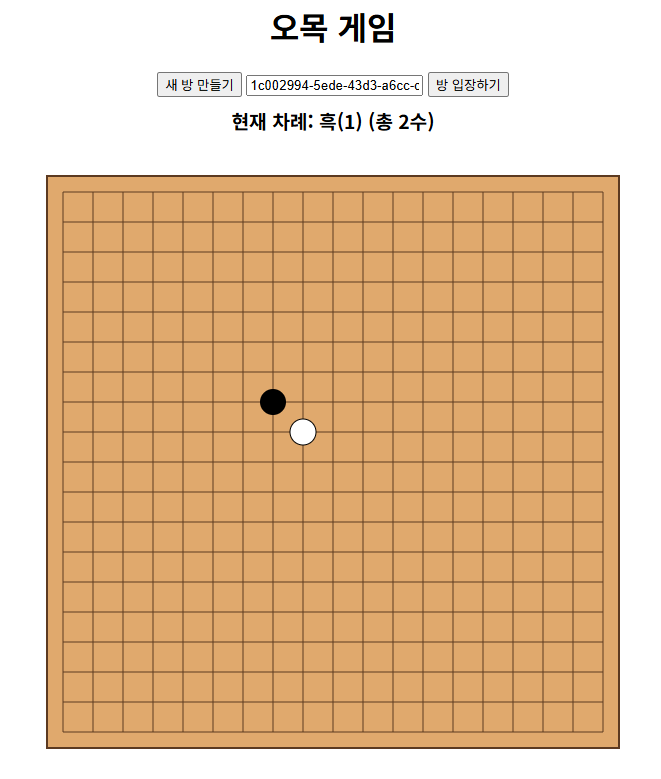
대체 어디서 멀티스레드가 돌고 있다는 거지?
결론부터 말하자면, 멀티스레드는 개발자가 직접 코드로 짜는 대신 Spring Boot(내장된 Tomcat 서버) 내부에서 자동으로 작동하고 있다.
- Tomcat의 Thread Pool
Spring Boot 앱을 실행하면 내부에 있는 Tomcat이라는 웹 서버가 같이 실행된다. Tomcat은 켜지자마자 기본적으로 200개의 스레드를 미리 만들어 두는데, 이를 Thread Pool이라고 한다.- 클라이언트 A가 방을 만들기 위해 접속 → 톰캣이 1번 스레드를 꺼내서 응답
- 클라이언트 B, C, D가 동시에 착수함 → 톰캣이 2번, 3번, 4번 스레드를 동시에 꺼내서 각각의 메시지를 병렬 처리
- 처리가 끝나면 스레드는 다시 Pool로 돌아가 다음 요청을 대기
- 컨트롤러의
@MessageMapping실행 시점
A 플레이어와 B 플레이어가 거의 0.001초 차이로 동시에 마우스를 클릭했다고 가정해 보자. 이때 Spring Boot는 A의 클릭을 처리하는 스레드 하나, B의 클릭을 처리하는 스레드 하나를 동시에 실행시킨다. 즉, 아래의makeMove메서드는 여러 스레드에 의해 동시에 겹쳐서 실행되고 있는 것이다.
@MessageMapping("/game/{id}/move")
public GameStateResponse makeMove(...) {
    return gameService.makeMove(id, req.x(), req.y());
}GameService.java가 이미 멀티스레드 환경 대비가 되었음ConcurrentHashMap사용: 여러 스레드가 동시에 이 Map에 접근해서 방을 만들거나 조회해도 에러가 나지 않게(Thread-safe) 하겠다는 의미synchronized동기화 블록 사용:synchronized (g)블록이 있기 때문에 먼저 도착한 스레드가 처리를 끝낼 때까지 0.001초 늦게 도착한 스레드는 문 밖에서 대기하게 된다. 따라서 바둑판의 상태가 꼬이지 않고 안전하게 유지된다.
// 1. ConcurrentHashMap 사용
private final Map<String, Game> games = new ConcurrentHashMap<>();

// 2. synchronized 동기화 블록 사용
public GameStateResponse makeMove(String id, int x, int y) {
    Game g = games.get(id);
    // ...
    synchronized (g) {
        // ...
    }
}
오늘의 TIL
1. ConcurrentLinkedQueue
자바의 ConcurrentLinkedQueue는 동시성 프로그래밍에서 안전하게 사용할 수 있는 비동기적(non-blocking) 큐 구현체다.
- 특징
- 비동기적으로 작동하는 연결 리스트 기반 큐
- 멀티스레드 환경에서 락 없이 안전하게 접근할 수 있도록 설계됨
- 내부적으로 원자적 연산을 활용해 동시성을 보장
- FIFO 방식으로 요소를 관리
- 주요 동작 방식과 장점
- 비동기적 락 프리 알고리즘 사용으로 스레드 간 경쟁이 적어 높은 성능을 발휘함
- offer(), poll(), peek() 등의 메서드를 통해 큐에 원소를 넣거나 빼는 작업이 안전하게 처리됨
- 스레드가 많거나, 동시 처리량이 중요한 환경에서 효과적임
- null 요소를 저장할 수 없으며, 큐가 비어 있을 때 poll()은 null을 반환함
- 사용 예시
import java.util.concurrent.ConcurrentLinkedQueue;

ConcurrentLinkedQueue<String> queue = new ConcurrentLinkedQueue<>();

queue.offer("첫 번째");
queue.offer("두 번째");

String item = queue.poll(); // "첫 번째"- 일반 Queue와 ConcurrentLinkedQueue의 차이점
| 구분 | 일반 Queue (LinkedList 등) | ConcurrentLinkedQueue |
| 동시성 지원 | 동기화되지 않아 멀티스레드 환경에서 안전하지 않음 | 내부적으로 락 없이 안전하게 동시 접근 가능 (락 프리, 비동기적) |
| 락 사용 여부 | 필요 시 외부에서 synchronized 등으로 직접 락 처리해야 함 | 락 없이 내부 원자적 연산 사용 (CAS, Compare-And-Swap) |
| 성능 | 멀티스레드 환경에서 경쟁 발생 시 성능 저하 가능성 큼 | 높은 동시성 환경에서 경쟁 최소화로 높은 처리량과 낮은 지연 시간 보장 |
| null 요소 허용 여부 | null 삽입 가능 (구현체에 따라 다름) | null 요소는 허용하지 않음 |
| 사용 용도 | 단일 스레드나 락 처리를 직접 하는 환경에 적합 | 멀티스레드에서 락 없이 안전한 큐가 필요할 때 적합 |
2. ConcurrentHashMap
자바의 ConcurrentHashMap은 멀티스레드 환경에서 안전하게 사용할 수 있도록 설계된 해시맵 구현체다.
- 동작 원리
- 내부적으로 여러 개의 세그먼트(또는 버킷)로 분할해 락을 세분화함으로써 동시 업데이트 성능을 높임
- 락 분할 기법을 사용하여 전체 맵이 아닌 일부 영역만 잠금 → 경쟁 감소
- 특징
- null 키와 null 값을 허용하지 않음
- 멀티스레드 환경에서 동시 읽기와 쓰기 모두 원활
- 높은 처리량과 낮은 지연 시간을 지원
- 사용 예시
import java.util.concurrent.ConcurrentHashMap;

public class Example {
    public static void main(String[] args) {
        ConcurrentHashMap<String, Integer> map = new ConcurrentHashMap<>();

        // 값 추가
        map.put("apple", 3);
        map.put("banana", 5);

        // 값 조회
        int appleCount = map.get("apple");
        System.out.println("apple count: " + appleCount);

        // 값 업데이트
        map.computeIfPresent("banana", (key, value) -> value + 2);

        System.out.println("banana count: " + map.get("banana"));
    }
}- 일반 HashMap과의 차이
| 구분 | HashMap | ConcurrentHashMap |
| 동기화 지원 여부 | 동기화되지 않음. 멀티스레드 환경에서 직접 동기화 필요 | 내부적 동기화 지원, 멀티스레드 환경에서 안전 |
| 락(lock) 방식 | 없음 (동기화 필요 시 외부에서 별도 처리) | 락 분할, 락 프리(최신 버전) 기법 적용 |
| 성능 | 단일 스레드 환경에서 빠름 | 멀티스레드 환경에서 더 나은 동시성 제공 |
| null 키/값 허용 | null 키와 null 값 허용 가능 | null 키와 null 값 허용하지 않음 |
| Iterator 일관성 | fail-fast(구조 변경 시 예외 발생) | weakly consistent(구조 변경 중에도 일부 반영) |
| 사용 목적 | 단일 스레드 혹은 외부 동기화 후 사용 | 멀티스레드 환경에서 동시 처리용 |
3. synchronized
자바의 synchronized는 멀티스레드 환경에서 여러 스레드가 동시에 공유 자원에 접근할 때 발생할 수 있는 데이터 불일치 문제를 방지하기 위해 사용하는 동기화 키워드다.
- 동작 원리:
- synchronized가 붙은 메서드나 블록은 해당 객체의 모니터 락 또는 객체 락을 획득한 스레드만 진입 가능
- 락을 획득한 스레드가 작업을 마치면 락을 해제하여 다음 스레드가 진입할 수 있게 함
- 효과
- 상호 배제: 동시에 하나의 스레드만 임계 영역 진입 가능
- 가시성 보장: 한 스레드가 변경한 변수 값이 다른 스레드에 즉시 반영되어 보임 (메모리 가시성 측면)
- 데이터 일관성 보장: 공유 자원에 대한 경쟁 조건 방지
- 유의사항
- synchronized 과도한 사용 시 성능 저하 발생 가능 (락 경쟁, 교착 상태 위험)
- 락 객체를 신중히 선택해야 하며, 가능하면 락 범위를 최소화하는 것이 좋음
- 사용 예시
/* 1. 메서드 동기화: 메서드 전체가 락 범위가 됨 */
public synchronized void method() {
    // 임계 영역, 한 번에 한 스레드만 실행 가능
}

/* 2. 블록 동기화 */
public void method() {
    synchronized (this) {
        // 특정 코드 블록만 동기화
    }
}

/* 3. 클래스 락 */
public static synchronized void staticMethod() {
    // 클래스 단위 락
}
후기
사실 내가 생각했던 완성된 프로젝트는 Java 프로그램 형식처럼 직접 멀티스레드를 짜서 구현하는 방식이었다. 하지만 Spring Boot에서는 그냥 Tomcat에서 알아서 멀티스레드를 처리해준다고 하니 참 기술이 많이 좋아졌다는 생각이 들었다.😅
'프레임워크 > Spring' 카테고리의 다른 글
| [Spring] JPA와 H2 DB (0) | 2026.03.10 |
|---|---|
| [Spring Boot] Spring CRUD 구현 - Day 1 (0) | 2026.03.10 |
| [Spring] Spring MVC (0) | 2026.03.09 |
| [Spring Boot] 오목 게임 만들기 - Day 1 (0) | 2026.02.21 |
| [Spring Boot] EC2 배포 가이드 (Backend & DB) (0) | 2025.11.25 |