
JPA란?
JPA(Java Persistence API)는 자바 객체와 데이터베이스 테이블을 연결해 주는 표준이다.
- 자바 클래스 하나를 만들고 @Entity 같은 표시를 붙이면 그걸 DB 테이블처럼 다룰 수 있게 해준다.
- 일반적으로 Hibernate와 Spring Data JPA가 함께 들어와서 객체 저장, 조회, 수정, 삭제 작업을 편하게 처리하게 해준다.
- Spring Data JPA는 Repository 인터페이스를 기반으로 구현체를 자동으로 만들어 주고, 메서드 이름만으로도 기본 조회 쿼리를 만들 수 있다.
H2란?
H2 DB는 가볍고 빠른 자바용 SQL 데이터베이스(RDBMS)이다.
- 특히 내장형(embedded), 서버 모드, 메모리 DB(in-memory) 를 지원해서, 개발할 때 아주 많이 쓴다.
- 설치가 거의 필요 없고, 메모리 기반으로 바로 띄울 수 있기 때문에 연습용이나 테스트 용으로 좋다.
- 스프링부트에서는 H2 콘솔을 제공하지만, 개발용으로만 사용할 것을 권장한다고 한다.
▪ JPA: 자바 객체를 DB 데이터처럼 다루게 해줌
▪ H2: 실제 데이터를 저장할 가벼운 DB
▪ 스프링부트: 둘을 자동 설정으로 쉽게 묶어줌
예제
[전체적인 흐름]
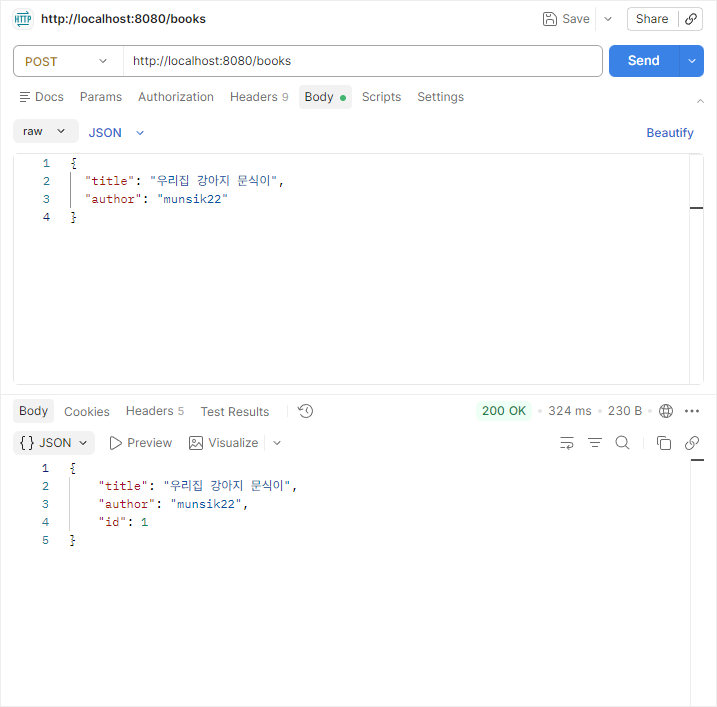
HTTP 요청 → Controller → Repository → H2 DB
- build.gradle
dependencies {
    implementation 'org.springframework.boot:spring-boot-starter-webmvc'
    implementation 'org.springframework.boot:spring-boot-starter-data-jpa'
    implementation 'org.springframework.boot:spring-boot-h2console'
    runtimeOnly 'com.h2database:h2'
    implementation 'org.projectlombok:lombok'
    annotationProcessor 'org.projectlombok:lombok'
    testImplementation 'org.springframework.boot:spring-boot-starter-webmvc-test'
    testRuntimeOnly 'org.junit.platform:junit-platform-launcher'
}
※ 스프링부트 4.x 버전부터는 h2console 의존성을 추가해야 H2 콘솔을 사용할 수 있다.
- application.properties
- jdbc:h2:mem:testdb: 메모리 안에 DB를 만든다.
- ddl-auto=create-drop: 실행 시 테이블을 만들고 종료 시 지운다.
- show-sql=true: 실행된 SQL을 콘솔에 보여준다.
- spring.h2.console.enabled=true: H2 콘솔을 켠다.
spring.datasource.url=jdbc:h2:mem:testdb
spring.datasource.driverClassName=org.h2.Driver
spring.datasource.username=sa
spring.datasource.password=

spring.jpa.hibernate.ddl-auto=create-drop
spring.jpa.show-sql=true

spring.h2.console.enabled=true
spring.h2.console.path=/h2-console- Book.java (엔티티 클래스)
- @Entity가 붙은 클래스는 JPA가 관리하는 엔티티가 된다.
- @Id는 기본 키이고, @GeneratedValue는 값을 자동 생성한다는 뜻이다.
package com.example.demo.entity;

import jakarta.persistence.Entity;
import jakarta.persistence.GeneratedValue;
import jakarta.persistence.GenerationType;
import jakarta.persistence.Id;
import lombok.Getter;
import lombok.Setter;

@Getter
@Entity
public class Book {

    @Id
    @GeneratedValue(strategy = GenerationType.IDENTITY)
    private Long id;

    @Setter
    private String title;
    @Setter
    private String author;

    public Book() {
    }

    public Book(String title, String author) {
        this.title = title;
        this.author = author;
    }

}- BookRepository.java (레포지토리)
package com.example.demo.repository;

import com.example.demo.entity.Book;
import org.springframework.data.jpa.repository.JpaRepository;

public interface BookRepository extends JpaRepository<Book, Long> {
}
Spring Data JPA의 저장소 추상화는 Repository를 중심으로 하고, CRUD 기능을 노출하려면 CrudRepository나 그 변형을 확장하면 된다.
- BookController.java (컨트롤러)
package com.example.demo.controller;

import com.example.demo.entity.Book;
import com.example.demo.repository.BookRepository;
import org.springframework.http.ResponseEntity;
import org.springframework.web.bind.annotation.*;

import java.util.List;

@RestController
@RequestMapping("/books")
public class BookController {

    private final BookRepository bookRepository;

    public BookController(BookRepository bookRepository) {
        this.bookRepository = bookRepository;
    }

    @PostMapping
    public Book createBook(@RequestBody Book book) {
        return bookRepository.save(book);
    }

    @GetMapping
    public List<Book> getAllBooks() {
        return bookRepository.findAll();
    }

    @GetMapping("/{id}")
    public ResponseEntity<Book> getBook(@PathVariable Long id) {
        return bookRepository.findById(id)
                .map(ResponseEntity::ok)
                .orElse(ResponseEntity.notFound().build());
    }

    @DeleteMapping("/{id}")
    public ResponseEntity<Void> deleteBook(@PathVariable Long id) {
        if (!bookRepository.existsById(id)) {
            return ResponseEntity.notFound().build();
        }

        bookRepository.deleteById(id);
        return ResponseEntity.noContent().build();
    }
}
'프레임워크 > Spring' 카테고리의 다른 글
| [Spring Boot] Spring CRUD 구현 - Day 3 (0) | 2026.03.12 |
|---|---|
| [Spring Boot] Spring CRUD 구현 - Day 2 (0) | 2026.03.11 |
| [Spring Boot] Spring CRUD 구현 - Day 1 (0) | 2026.03.10 |
| [Spring] Spring MVC (0) | 2026.03.09 |
| [Spring Boot] 오목 게임 만들기 - Day 2 (0) | 2026.02.23 |