1️⃣ 입력값 검증 및 전역 예외 처리 구현
build.gradle
dependencies {
    implementation 'org.springframework.boot:spring-boot-starter-webmvc'
    implementation 'org.projectlombok:lombok'
    implementation 'org.springframework.boot:spring-boot-starter-data-jpa'
    implementation 'org.springframework.boot:spring-boot-starter-webservices'
    implementation 'org.springframework.boot:spring-boot-starter-validation' // 추가
    annotationProcessor 'org.projectlombok:lombok'
    testImplementation 'org.springframework.boot:spring-boot-starter-webmvc-test'
    runtimeOnly 'com.h2database:h2'
    implementation 'org.springframework.boot:spring-boot-h2console'
    testRuntimeOnly 'org.junit.platform:junit-platform-launcher'
}
PostRequest.java (요청 DTO)
package com.example.springcrudback.post;

import jakarta.validation.constraints.NotBlank;
import jakarta.validation.constraints.Size;
import lombok.Getter;
import lombok.Setter;

@Getter @Setter
public class PostRequest {

    @NotBlank(message = "제목은 비어 있을 수 없습니다.")
    @Size(max = 100, message = "제목은 100자 이하여야 합니다.")
    private String title;

    @NotBlank(message = "내용은 비어 있을 수 없습니다.")
    @Size(max = 1000, message = "내용은 1000자 이하여야 합니다.")
    private String content;

    public PostRequest() {
    }

    public PostRequest(String title, String content) {
        this.title = title;
        this.content = content;
    }

}- @NotBlank, @Size 같은 제약 조건은 Bean Validation의 대표적인 방식이다.
PostController.java
package com.example.springcrudback.post;

import jakarta.validation.Valid;
import org.springframework.http.HttpStatus;
import org.springframework.web.bind.annotation.*;

import java.util.List;

@RestController @RequestMapping("/posts")
public class PostController {

    private final PostService postService;

    public PostController(PostService postService) {
        this.postService = postService;
    }

    @PostMapping @ResponseStatus(HttpStatus.CREATED)
    public Post create(@Valid @RequestBody PostRequest request) {
        return postService.create(request);
    }

    @GetMapping
    public List<Post> findAll() {
        return postService.findAll();
    }

    @GetMapping("/{id}")
    public Post findById(@PathVariable Long id) {
        return postService.findById(id);
    }

    @PutMapping("/{id}")
    public Post update(@PathVariable Long id, @Valid @RequestBody PostRequest request) {
        return postService.update(id, request);
    }

    @DeleteMapping("/{id}")
    @ResponseStatus(HttpStatus.NO_CONTENT)
    public void delete(@PathVariable Long id) {
        postService.delete(id);
    }
}- Spring MVC는 @RequestMapping 메서드에서 Bean Validation을 지원하고, @Valid를 통해 요청 본문 객체 검증을 트리거할 수 있다.
PostNotFoundException.java
package com.example.springcrudback.post;

public class PostNotFoundException extends RuntimeException {

    public PostNotFoundException(Long id) {
        super("Post with id " + id + " does not exist");
    }
}- 게시글 없음 예외를 따로 만들었다.
- 이렇게 예외를 따로 만들면, 나중에 없는 글과 입력값 오류를 구분해서 처리하기 쉬워진다.
PostService.java
package com.example.springcrudback.post;

import org.springframework.stereotype.Service;

import java.util.List;

@Service
public class PostService {

    private final PostRepository postRepository;

    public PostService(PostRepository postRepository) {
        this.postRepository = postRepository;
    }

    public Post create(PostRequest request) {
        Post post = new Post(request.getTitle(), request.getContent());
        return postRepository.save(post);
    }

    public List<Post> findAll() {
        return postRepository.findAll();
    }

    public Post findById(Long id) {
        return postRepository.findById(id)
                .orElseThrow(() -> new PostNotFoundException(id));
    }

    public Post update(Long id, PostRequest request) {
        Post post = postRepository.findById(id)
                .orElseThrow(() -> new PostNotFoundException(id));

        post.setTitle(request.getTitle());
        post.setContent(request.getContent());

        return postRepository.save(post);
    }

    public void delete(Long id) {
        Post post = postRepository.findById(id)
                .orElseThrow(() -> new PostNotFoundException(id));

        postRepository.delete(post);
    }
}
ErrorResponse.java (에러 응답용 클래스)
package com.example.springcrudback.post;

import lombok.Getter;

import java.time.LocalDateTime;
import java.util.Map;

@Getter
public class ErrorResponse {

    private final int status;
    private final String message;
    private final LocalDateTime timestamp;
    private Map<String, String> validationErrors;

    public ErrorResponse(int status, String message, LocalDateTime timestamp) {
        this.status = status;
        this.message = message;
        this.timestamp = timestamp;
    }

    public ErrorResponse(int status, String message, LocalDateTime timestamp, Map<String, String> validationErrors) {
        this.status = status;
        this.message = message;
        this.timestamp = timestamp;
        this.validationErrors = validationErrors;
    }

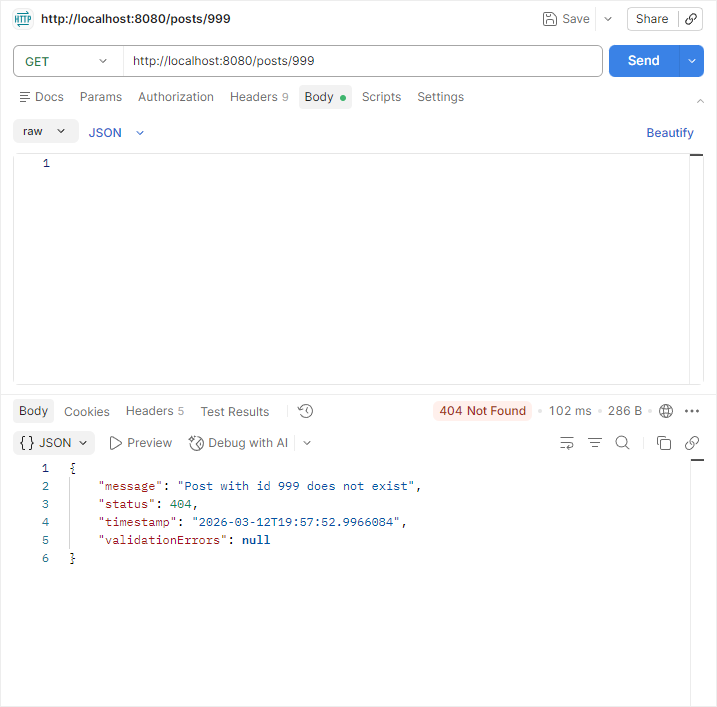
}- 에러가 발생했을 때 아래와 같은 JSON 형식으로 반환될 수 있다.
{
  "status": 400,
  "message": "입력값이 올바르지 않습니다.",
  "timestamp": "2026-03-12T19:30:00",
  "validationErrors": {
    "title": "제목은 비어 있을 수 없습니다."
  }
}
GlobalExceptionHandler.java (전역 처리 예외 핸들러)
package com.example.springcrudback.post;

import org.springframework.http.HttpStatus;
import org.springframework.http.ResponseEntity;
import org.springframework.web.bind.MethodArgumentNotValidException;
import org.springframework.web.bind.annotation.ControllerAdvice;
import org.springframework.web.bind.annotation.ExceptionHandler;

import java.time.LocalDateTime;
import java.util.LinkedHashMap;
import java.util.Map;

@ControllerAdvice
public class GlobalExceptionHandler {

    @ExceptionHandler(PostNotFoundException.class)
    public ResponseEntity<ErrorResponse> handlePostNotFound(PostNotFoundException e) {
        ErrorResponse response = new ErrorResponse(
                HttpStatus.NOT_FOUND.value(),
                e.getMessage(),
                LocalDateTime.now()
        );

        return ResponseEntity.status(HttpStatus.NOT_FOUND).body(response);
    }

    @ExceptionHandler(MethodArgumentNotValidException.class)
    public ResponseEntity<ErrorResponse> handleValidation(MethodArgumentNotValidException e) {
        Map<String, String> errors = new LinkedHashMap<>();

        e.getBindingResult().getFieldErrors().forEach(error ->
                errors.put(error.getField(), error.getDefaultMessage())
        );

        ErrorResponse response = new ErrorResponse(
                HttpStatus.BAD_REQUEST.value(),
                "입력값이 올바르지 않습니다.",
                LocalDateTime.now(),
                errors
        );

        return ResponseEntity.badRequest().body(response);
    }

    @ExceptionHandler(Exception.class)
    public ResponseEntity<ErrorResponse> handleEtc(Exception e) {
        ErrorResponse response = new ErrorResponse(
                HttpStatus.INTERNAL_SERVER_ERROR.value(),
                "서버 내부 오류가 발생했습니다.",
                LocalDateTime.now()
        );

        return ResponseEntity.status(HttpStatus.INTERNAL_SERVER_ERROR).body(response);
    }
}- @ControllerAdvice는 여러 컨트롤러에 공통으로 적용되는 예외 처리 지점을 만들 때 쓴다.
- @ExceptionHandler는 특정 예외를 잡아 응답으로 바꾸는 데 사용한다.
테스트
- 잘못된 요청 1: 빈 제목

- 잘못된 요청 2: 없는 게시글 조회
2️⃣ 요청/응답 DTO 분리
DTO란?
DTO(Data Transfer Object, 데이터 전송 객체)는 프로세스 간(예: 클라이언트-서버) 데이터를 전달하는 데 사용되는 순수 데이터 컨테이너다. 비즈니스 로직 없이 Getter와 Setter 메서드만 포함하며, 계층 간 데이터 교환 시 유지보수성 향상과 보안을 위해 주로 사용된다.
왜 굳이 나누나요?
엔티티를 그대로 쓰면 처음엔 편하지만, 나중에 이런 문제가 생길 수 있다.
- DB용 필드가 API 응답에 그대로 노출될 수 있음
- 응답 모양을 바꾸고 싶을 때 엔티티까지 건드려야 함
- 요청 형식과 응답 형식이 달라도 유연하게 대응하기 어려움
JSON 응답은 객체를 직렬화해서 내려주기 때문에, 어떤 객체를 응답으로 내보내는지가 API 모양을 사실상 결정한다. 그래서 엔티티와 API 응답 객체를 분리하는 게 실무에서 많이 쓰이는 방식이다.
이번 단계에서 바뀌는 구조
- 기존
클라이언트 ↔ PostRequest / Post 엔티티
- 변경 후
클라이언트 → PostRequest
서버 내부 → Post
엔티티 서버 응답 → PostResponse
PostRequest.java
요청 DTO는 검증용으로 그대로 유지한다.
PostResponse.java (응답 DTO)
package com.example.springcrudback.post;

import lombok.Getter;

@Getter
public class PostResponse {

    private final Long id;
    private final String title;
    private final String content;

    public PostResponse(Long id, String title, String content) {
        this.id = id;
        this.title = title;
        this.content = content;
    }

    public static PostResponse from(Post post) {
        return new PostResponse(
                post.getId(),
                post.getTitle(),
                post.getContent()
        );
    }

}- public static PostResponse from(Post post) 메서드를 통해 엔티티를 응답 DTO로 변환한다.
PostService.java
package com.example.springcrudback.post;

import org.springframework.stereotype.Service;

import java.util.List;

@Service
public class PostService {

    private final PostRepository postRepository;

    public PostService(PostRepository postRepository) {
        this.postRepository = postRepository;
    }

    public PostResponse create(PostRequest request) {
        Post post = new Post(request.getTitle(), request.getContent());
        Post savedPost = postRepository.save(post);
        return PostResponse.from(savedPost);
    }

    public List<PostResponse> findAll() {
        return postRepository.findAll()
                .stream()
                .map(PostResponse::from)
                .toList();
    }

    public PostResponse findById(Long id) {
        Post post = postRepository.findById(id)
                .orElseThrow(() -> new PostNotFoundException(id));

        return PostResponse.from(post);
    }

    public PostResponse update(Long id, PostRequest request) {
        Post post = postRepository.findById(id)
                .orElseThrow(() -> new PostNotFoundException(id));

        post.setTitle(request.getTitle());
        post.setContent(request.getContent());

        Post updatedPost = postRepository.save(post);
        return PostResponse.from(updatedPost);
    }

    public void delete(Long id) {
        Post post = postRepository.findById(id)
                .orElseThrow(() -> new PostNotFoundException(id));

        postRepository.delete(post);
    }
}- 서비스가 엔티티 대신 응답 DTO를 돌려주도록 변경했다.
- 내부에서는 Post 엔티티 사용
- 바깥으로는 PostResponse만 반환
PostController.java
package com.example.springcrudback.post;

import jakarta.validation.Valid;
import org.springframework.http.HttpStatus;
import org.springframework.web.bind.annotation.*;

import java.util.List;

@RestController
@RequestMapping("/posts")
public class PostController {

    private final PostService postService;

    public PostController(PostService postService) {
        this.postService = postService;
    }

    @PostMapping
    @ResponseStatus(HttpStatus.CREATED)
    public PostResponse create(@Valid @RequestBody PostRequest request) {
        return postService.create(request);
    }

    @GetMapping
    public List<PostResponse> findAll() {
        return postService.findAll();
    }

    @GetMapping("/{id}")
    public PostResponse findById(@PathVariable Long id) {
        return postService.findById(id);
    }

    @PutMapping("/{id}")
    public PostResponse update(@PathVariable Long id, @Valid @RequestBody PostRequest request) {
        return postService.update(id, request);
    }

    @DeleteMapping("/{id}")
    @ResponseStatus(HttpStatus.NO_CONTENT)
    public void delete(@PathVariable Long id) {
        postService.delete(id);
    }
}- 컨트롤러도 응답 DTO를 사용하도록 수정했다.
뭐가 좋아졌나요?
예를 들어 나중에 엔티티에 이런 필드가 추가된다고 가정해보자.
private String internalMemo;
private LocalDateTime createdAt;
private LocalDateTime updatedAt;
엔티티를 그대로 응답하면 이런 값도 API로 나갈 수 있다. 그런데 PostResponse를 쓰면 응답에 보여줄 필드만 골라서 내보낼 수 있다. 즉, DTO 분리를 하면,
- 숨길 값은 숨기고
- 보여줄 값만 보여주고
- 응답 형식을 안정적으로 유지할 수 있다.
전체 흐름은 다음과 같다.
POST /posts
→ PostRequest로 입력 받음
→ Service에서 Post 엔티티 생성
→ Repository로 저장
→ 저장된 Post를 PostResponse로 변환
→ JSON 응답
3️⃣ 생성 시간/수정 시간 필드 추가
Spring Data JPA는 생성 시간이나 수정 시간 용도로 Auditing 기능을 제공하고, @CreatedDate와 @LastModifiedDate로 생성 시각과 수정 시각을 자동 기록할 수 있다. 이 값에는 Instant 같은 Java 시간 타입도 사용할 수 있다.
Application.java
package com.example.springcrudback;

import org.springframework.boot.SpringApplication;
import org.springframework.boot.autoconfigure.SpringBootApplication;
import org.springframework.data.jpa.repository.config.EnableJpaAuditing; // 추가

@EnableJpaAuditing // 추가
@SpringBootApplication
public class SpringCrudBackApplication {

    public static void main(String[] args) {
        SpringApplication.run(SpringCrudBackApplication.class, args);
    }

}- @EnableJpaAuditing를 붙이면 Spring Data JPA의 Auditing 기능을 켤 수 있다. 생성일과 수정일을 자동으로 채우려면 이 설정이 필요하다.
Post 엔티티에 생성일/수정일 추가
package com.example.springcrudback.post;

import jakarta.persistence.Entity;
import jakarta.persistence.EntityListeners;
import jakarta.persistence.GeneratedValue;
import jakarta.persistence.GenerationType;
import jakarta.persistence.Id;
import lombok.Getter;
import lombok.Setter;
import org.springframework.data.annotation.CreatedDate;
import org.springframework.data.annotation.LastModifiedDate;
import org.springframework.data.jpa.domain.support.AuditingEntityListener;

import java.time.Instant;

@Getter
@Entity
@EntityListeners(AuditingEntityListener.class)
public class Post {

    @Id
    @GeneratedValue(strategy = GenerationType.IDENTITY)
    private Long id;

    @Setter
    private String title;
    @Setter
    private String content;

    @CreatedDate
    private Instant createdAt;

    @LastModifiedDate
    private Instant updatedAt;

    public Post() {
    }

    public Post(String title, String content) {
        this.title = title;
        this.content = content;
    }

}- @CreatedDate, @LastModifiedDate 어노테이션을 사용해 언제 생성되었는지, 언제 수정되었는지를 기록하는 데 쓰이고, Instant 같은 JDK 8 날짜/시간 타입에 적용할 수 있다.
- AuditingEntityListener를 통해 엔티티 변경 시점에 이 값들이 채워진다.
응답 DTO에도 시간 필드 추가
package com.example.springcrudback.post;

import java.time.Instant;

public record PostResponse(Long id, String title, String content, Instant createdAt, Instant updatedAt) {

    public static PostResponse from(Post post) {
        return new PostResponse(
                post.getId(),
                post.getTitle(),
                post.getContent(),
                post.getCreatedAt(),
                post.getUpdatedAt()
        );
    }

}
PostService.java
생성일/수정일은 직접 넣지 않아도 Auditing이 알아서 채워주기 때문에 수정할 필요가 없다.
PostController.java
컨트롤러도 그대로 사용한다.
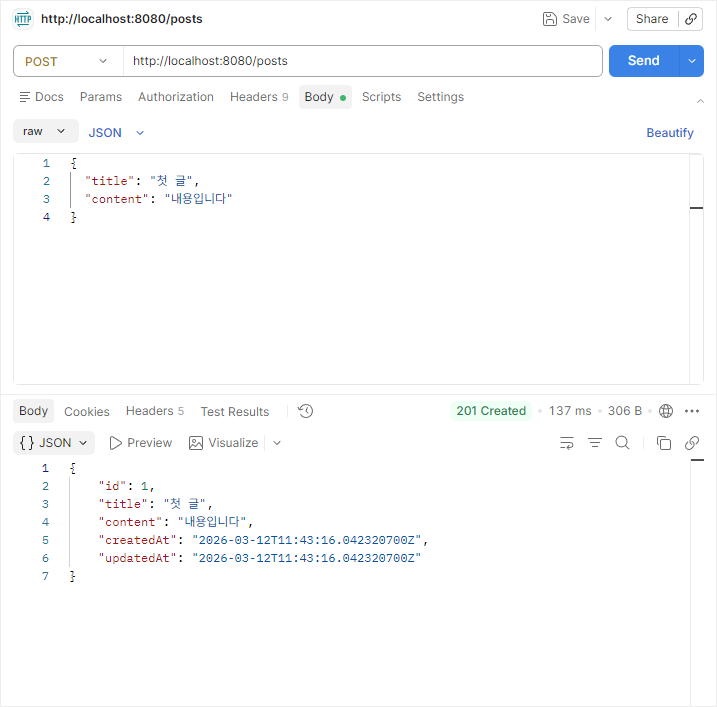
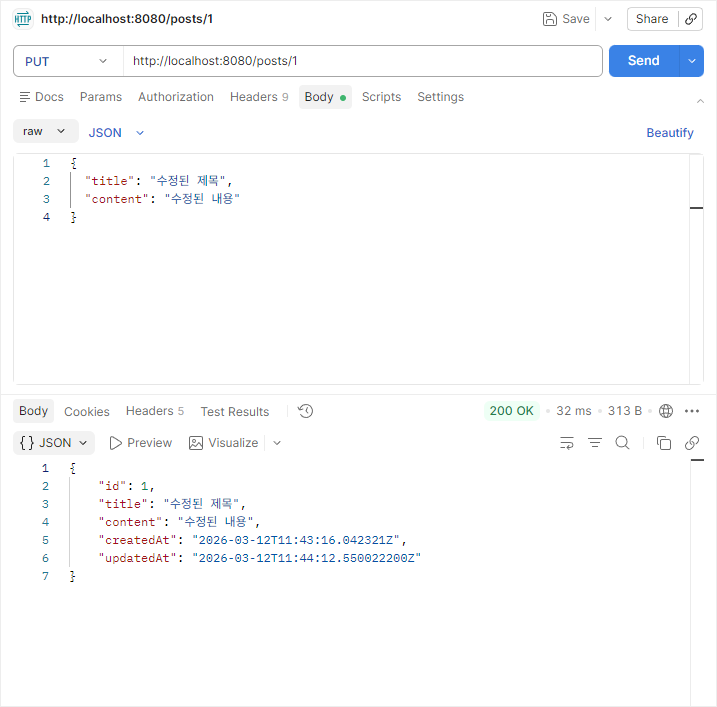
테스트
- 게시글 생성
- 게시글 수정
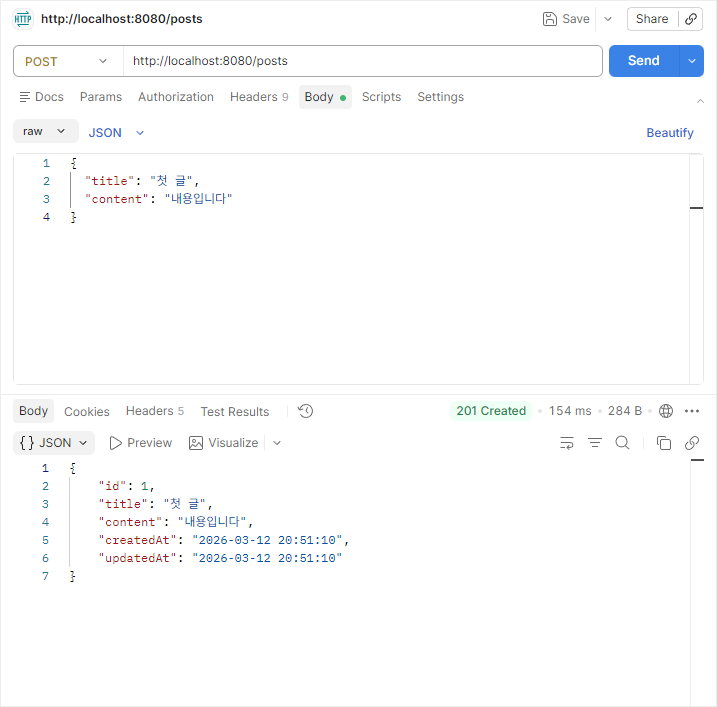
서버에는 KST가 아니라 UTC 기준으로 입력되기 때문에 한국 시간 기준으로 사용하려면 PostResponse에서 UTC를 KST로 변환하는 코드를 추가해야 한다.
package com.example.springcrudback.post;

import java.time.Instant;
import java.time.ZoneId;
import java.time.format.DateTimeFormatter;

public record PostResponse(Long id, String title, String content, String createdAt, String updatedAt) {

    private static final ZoneId KST = ZoneId.of("Asia/Seoul");
    private static final DateTimeFormatter FORMATTER =
            DateTimeFormatter.ofPattern("yyyy-MM-dd HH:mm:ss")
                    .withZone(KST);

    public static PostResponse from(Post post) {
        return new PostResponse(
                post.getId(),
                post.getTitle(),
                post.getContent(),
                format(post.getCreatedAt()),
                format(post.getUpdatedAt())
        );
    }

    private static String format(Instant instant) {
        return instant == null ? null : FORMATTER.format(instant);
    }

}
내일 할 일
- 로그인, 회원가입 기능 추가
- 댓글 기능 추가
'프레임워크 > Spring' 카테고리의 다른 글
| [Spring Boot] Spring CRUD 구현 - Day 5 : 댓글 기능 구현 (0) | 2026.03.16 |
|---|---|
| [Spring Boot] Spring CRUD 구현 - Day 4 : Spring Security + JWT (0) | 2026.03.13 |
| [Spring Boot] Spring CRUD 구현 - Day 2 (0) | 2026.03.11 |
| [Spring] JPA와 H2 DB (0) | 2026.03.10 |
| [Spring Boot] Spring CRUD 구현 - Day 1 (0) | 2026.03.10 |